
Amazon Buy Box and hijacker alerts: catch offer changes before sales drop
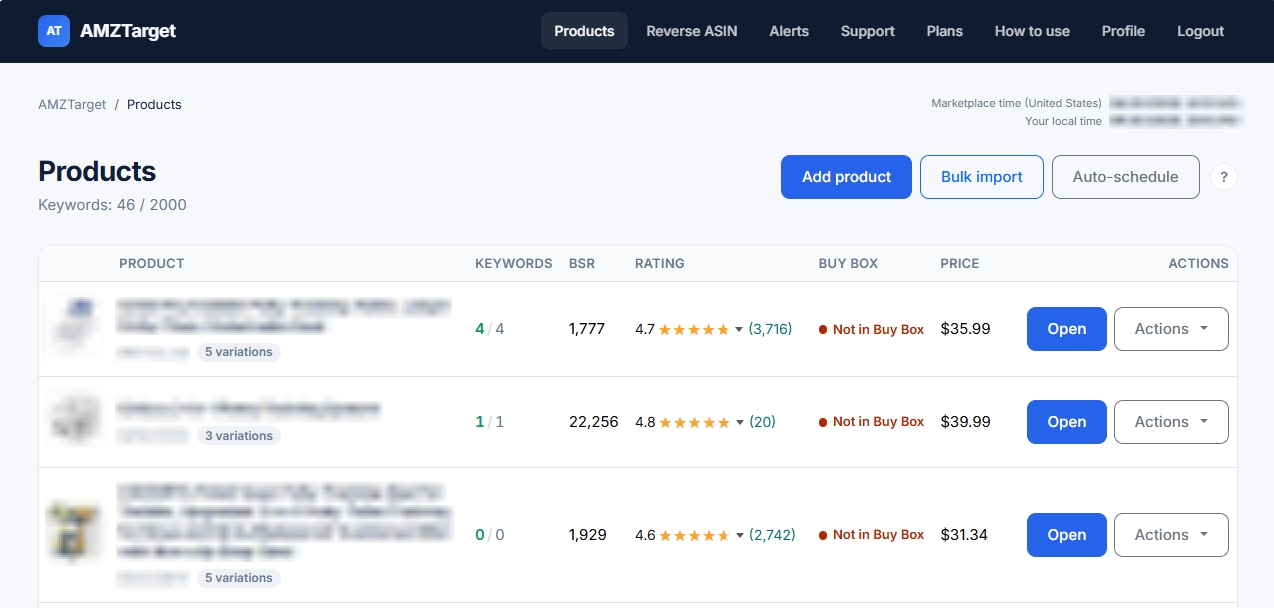
Your listing is still live, your ads are running, and the content has not changed - but orders suddenly drop. Sound familiar? Often, rankings are not the problem: a third-party seller (hijacker) has joined your ASIN, taken the Buy Box (purchase button), pushed down the price, or the product has simply run out of stock at the FBA warehouse. If you only find out a week later, the loss in ad spend and sales can be huge.
A hijacker alert does not promise to block the offender automatically. Its real purpose is to send an immediate Telegram notification so you can act in time and protect your revenue.
What does a Buy Box alert actually track?
The Buy Box (or Featured Offer) is the main purchase block on a listing. You can own the brand and still lose the Buy Box: another seller, your own distributor, or Amazon's system may take it because the price or delivery time has changed.
To catch a problem early, automated monitoring tracks a set of signals:
- Buy Box ownership: whether the purchase button belongs to your Merchant ID.
- Number of sellers: whether the listing has gained or lost offers.
- Displayed price: whether the price shown on the storefront has changed and in which direction.
- Availability (Stock): whether the product is in stock for shoppers.
- Listing content: whether the title, category, or main image changed at the same time.
An increase in the number of sellers alone is a reason to check the listing, not proof of counterfeit goods. But if you lose the Buy Box and the price drops at the same time, that is a clear sign of an attack that requires an immediate response.
Why does checking for hijackers manually not work?
Sellers usually open Amazon themselves, look at the purchase block, and sometimes open the full seller list. This approach has four weaknesses:
- No consistency. At first, the listing is checked often, but later it may be checked only once a week. Weekends, holidays, and nighttime hours become complete blind spots.
- Memory fails. You may not remember whether the listing had one, two, or three sellers yesterday.
- Regional results. What you see from your country often differs from what a shopper in the United States sees.
- Spreadsheets do not send push notifications. A well-maintained Excel file is useless if important data sits there until the next team call.
Automation solves this problem: the service visits the page on a fixed schedule and immediately sends an alert to your phone if something goes wrong.
Which hijacker signals lead to real action?
Build your process around specific scenarios:
1. Has a new seller appeared (New Seller)?
When the seller count increases, the responsible manager should open the listing, check the seller's name, price, and fulfilment method (FBA or FBM), and then compare the seller with the list of authorized distributors.
2. Has the Buy Box been lost?
AMZTarget compares your Merchant ID with the one currently shown in the purchase button. If they do not match, you receive a notification. This is a direct signal to check the price, warehouse stock, and competitors' actions.
3. What is your commercial risk?
Calculate the “cost per hour” of downtime. If a product earns $20 in profit per hour and you check the listing once a day, a delayed response could cost you up to $480. An automated alert reduces the response time from a full day to a few minutes.
4. What else changed?
When you receive an alert, open the monitoring history in the service. If the title or main image disappeared or changed when you lost the Buy Box, the hijacker has taken control of the content.
How does AMZTarget handle Buy Box and hijacker monitoring?
You add an ASIN, set a schedule, and enter your Merchant ID in your profile. The service scans the product page, saves a baseline snapshot, and records any changes.
You can receive notifications by email or Telegram. You can also separate the channels: for example, send critical alerts about Buy Box loss and new hijackers to an urgent Telegram chat, and routine reports by email.
To protect your listing, enable these alerts:
- Buy Box loss or return
- Change in the number of sellers (New seller)
- Price change
- Availability change (Out of stock)
- 404 error (product page not found)
All events are saved in the Monitoring tab. The check frequency depends on your plan - during the trial and on paid plans, the listing is checked up to 12–24 times per day.
What should you do when you receive an alert?
Create a simple response procedure for your team:
- When a New Seller alert arrives: open the seller list, collect screenshots, check the seller's rights, and prepare a complaint to Amazon Brand Registry if necessary.
- When the Buy Box is lost: check whether the product has run out at FBA, whether competitors have changed their prices, and whether your listing has become inactive because of errors in your account.
Note: AMZTarget's Price Timer module can automatically adjust your price to competitors' prices (repricing), but this feature requires an SP-API connection. Monitoring public data itself works without access to your account.
Set up listing protection in 7 steps
To make sure the alerts work and establish a process, follow these 7 simple steps:
- Step 1. Define critical events. Decide what counts as an emergency for your business: a Buy Box change, an increase in the number of sellers, or the product going out of stock.
- Step 2. Sign up and add an ASIN. Create an account, add your main product, and choose the Amazon marketplace for that ASIN.
- Step 3. Enter your Merchant ID. Add your seller identifier in your profile so the system can accurately identify your purchase button.
- Step 4. Connect the Telegram bot. Set up urgent Buy Box and hijacker notifications in a Telegram chat.
- Step 5. Set a check schedule. Choose the best check frequency in settings (up to 12 checks per day are available during the trial).
- Step 6. Check the baseline snapshot. Open the Monitoring tab and make sure the service correctly recorded the current seller count, price, and Buy Box status.
- Step 7. Run a test drill. Walk through the response scenario with your team: who responds to a Buy Box loss alert, and how quickly.
Important limitations
AMZTarget checks public pages on a set schedule. Monitoring shows facts - the number of sellers changed or the Merchant ID in the purchase button changed - but it does not automatically file complaints with Amazon or remove hijackers for you. That is the seller's or legal team's responsibility.
Standard monitoring, rank tracking, and alerts DO NOT require access to Seller Central (SP-API). Access is required only for the automatic price adjustment module (Price Timer).
Key takeaway
Protecting a listing is not about checking the storefront at random. It is about responding quickly. Use precise Telegram alerts to shorten the time between a hijacker appearing and your team's response.
Create a free account · Compare plans and check frequency · Set up account notifications · Set product alerts · Choose a schedule · Enter your Merchant ID