
Amazon notifications in Telegram: what sellers should track and how to respond
While you are having coffee or busy with other work, anything can happen to your main ASIN: the price may jump, another seller may appear, the Buy Box may disappear, or the title may change. If you only learn about it the next day from a drop in sales, you will be putting out yesterday's fire.
Telegram notifications are not just for “staying informed.” They shorten the time between a problem and a response. The message on your phone is not what matters. What matters is how quickly the responsible manager opens the listing, checks the data, and solves the problem.
Why did manual listing checks stop working long ago?
Manual monitoring usually relies on someone's word and memory. Once a day, someone opens Amazon, enters the product code, looks at the page, and, if you are lucky, adds the figures to a spreadsheet. That may be enough for one product in a quiet season, but this approach has four problems:
- No consistency. “I'll check in the morning” easily becomes “I'll check this evening,” and listings are left completely unattended on weekends.
- No history. You can see the current listing, but you do not remember exactly what the title or bullets looked like yesterday.
- Unclear responsibility. When several people are responsible for a listing, each person assumes someone else has already checked it.
- Data gets stuck. Even if a manager spots a problem and records it in Google Sheets, the person who can reset the price or contact support learns about it too late.
Seller Central is necessary for managing your account, but it does not work as a real-time alert system. Spreadsheets are useful for reports, but they cannot send a push notification to your phone when a hijacker joins your listing.
What is actually worth sending to Telegram?
The more messages pour into a chat, the sooner people start ignoring them. Set up notifications only for events that require a response:
- Buy Box loss. If you enter your Merchant ID in your AMZTarget profile, the service can tell from the public page whether your offer or someone else's is currently in the purchase block. When an alert arrives, immediately check the price, FBA stock, and account status.
- New sellers. A new seller is a warning flare. It is not always a hijacker - your wholesaler or distributor may simply have become active again - but you should check the offer right away.
- Price and availability. Price swings hurt margins and conversion, while a sudden Out of Stock status immediately stops sales.
- Title, image, bullets, and category. Amazon often changes content without asking through contributor edits. If the main keyword quietly disappears from the title, the listing will lose organic visibility.
- Reviews and rating. A new negative review or a drop in the overall rating is a reason to check the product batch and service quality.
AMZTarget also has alerts for an Adult restriction ban, when a product disappears from search, and Page Not Found (404) status. Enable only alerts that you or your team are actually ready to respond to.
Which metrics should you use to measure the value of alerts?
To see whether the system works, track three simple things:
- Response time: how many minutes pass between the Telegram push notification and an employee writing “I'm on it.”
- Check time: how long it takes to open Amazon or Seller Central and understand the cause of the problem.
- Resolution time: how quickly the problem is fixed by resetting the price, sending a ticket to Amazon, or correcting the content.
If 90% of alerts are planned content edits, move them from the urgent Telegram chat to email. Only critical events should remain in the urgent channel.
How does AMZTarget deliver alerts to Telegram?
AMZTarget periodically visits the public page for your ASIN, records its details, and sends a notification if something has changed.
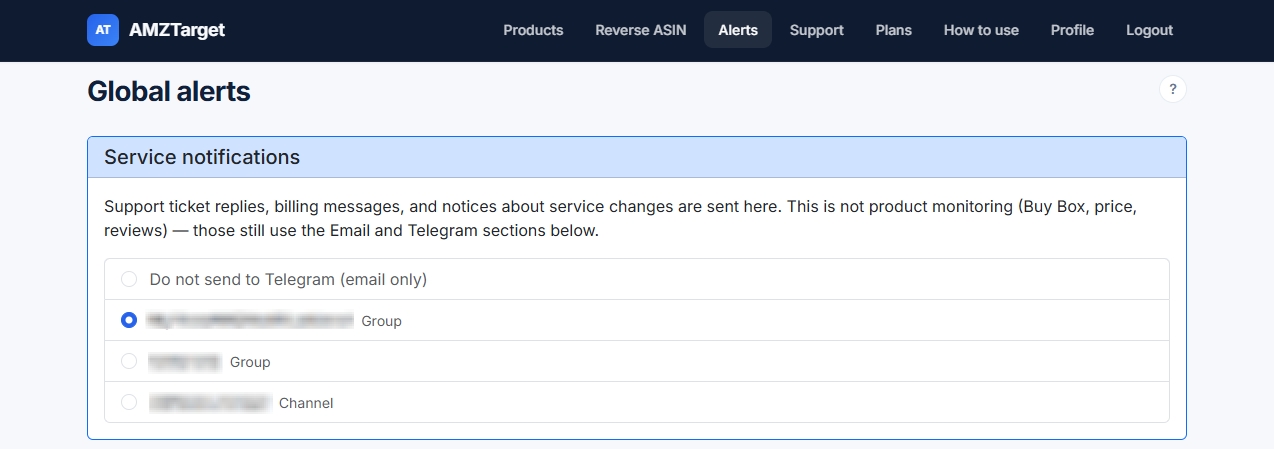
In the Notifications section, connect the Telegram bot, press Start, and link the required chat. Flexible routing is a key feature of paid plans. You can send critical alerts (Buy Box, hijackers, and price) for important ASINs to the on-call Telegram chat, while occasional cosmetic edits or reviews go by email to the content manager.
The full history of all changes is also saved in the product's Monitoring tab. Telegram gives you an immediate signal, while the dashboard shows the timeline: exactly what changed, when it changed, and what the new value was.
How should a team respond to a notification?
To keep the work chat from turning into a stream of “who's going to check this?” messages, introduce a simple 7-step procedure:
- Claim the task. When an alert arrives, the person on duty writes “Checking” in the chat or responds with an emoji.
- Check Amazon. Follow the link to the listing and inspect it yourself.
- Check the history. Open the “Monitoring” tab in AMZTarget and see exactly what changed (old value vs. new value).
- Open Seller Central. If the Buy Box was lost or the price changed, check the product's status inside the account.
- Assess the severity. Determine what happened: a planned event, an Amazon error, a competitor attack, or a content mistake.
- Assign an action. Set the correct price, contact support, resubmit the content, or simply make a note of it.
- Close the task. Post the result in the chat: “Price restored,” “Ticket submitted, waiting for a response,” and so on.
The main rule is that an alert reports a change; it is not a reason to panic. Another seller may be a legitimate reseller, and a changed title may be an edit made by your own marketer. Check the facts first, then act.
Important limitations
AMZTarget does not watch your listing every millisecond. It checks it on a set schedule - for example, 6, 12, or 24 times per day, depending on your plan. If checks run every 2 hours, an event will be detected within that 2-hour window.
The service also tracks what is visible on Amazon's public page. It shows that the price changed or the Buy Box was lost, but it cannot guess the internal reasons behind Amazon's algorithms, such as a lower late-shipment rating for your FBM warehouse.
You do not need to provide Seller Central access to monitor a listing, track rankings, use Reverse ASIN, or receive Telegram alerts - everything works with public data. An SP-API connection is required only if you want to use the automatic Price Timer (repricer), which changes the price on Amazon itself.
Take the first step toward control
Do not wait for another hijacker to steal your weekend revenue. Start with one Telegram channel and your main product.
Start free without a credit card · Compare plans and check frequency · Set up Telegram alerts · Set product notifications · View change history · Choose a schedule