Amazon listing alerts that reach the right person — in Telegram or email
15 event types, from a lost Buy Box to new negative review mentions. Send each one to its own Telegram chat, group, channel, or inbox — and give important ASINs their own rules.
- Free plan, no card
- No Seller Central access
- Telegram and email alerts
One inbox for everything is the same as no alerts
When every change lands in the same place, the important one gets buried under cosmetic edits.
Noise hides the signal
A category tweak and a lost Buy Box look the same in a busy inbox. The second one gets read tomorrow.
Nobody owns the event
The content manager gets price alerts, the owner gets image changes. Everyone assumes someone else reacted.
Key ASINs drown in the catalog
Your best seller deserves a louder channel than a test listing — but a single rule treats them the same.
15 events, grouped by what you do next
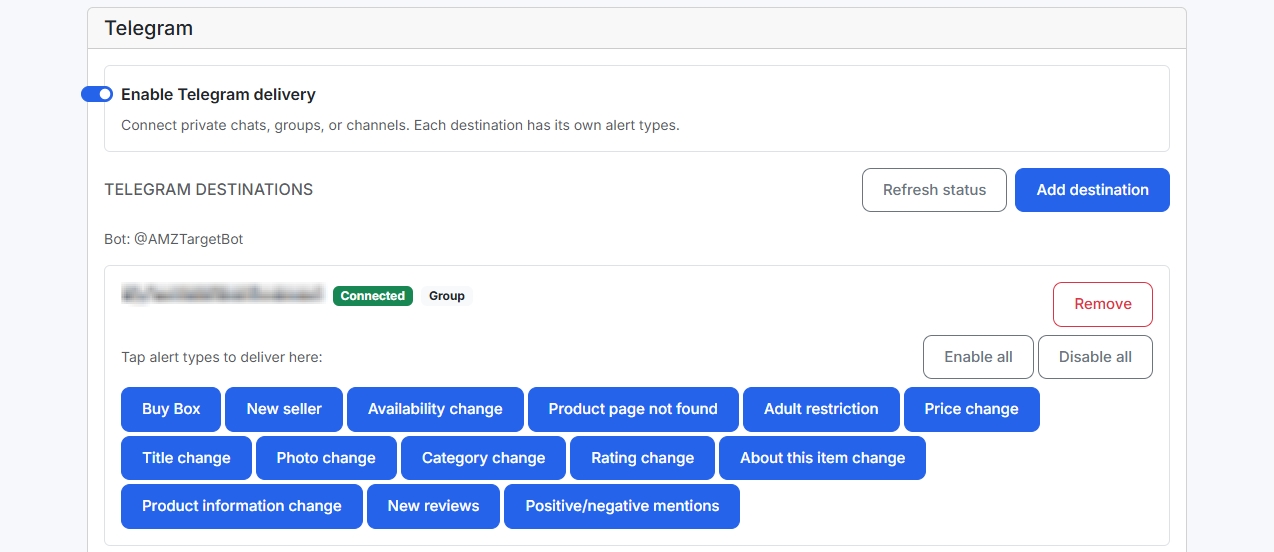
Each event is switched on separately for every chat and inbox.
Offer and Buy Box · 4
- Buy Box
- New seller
- Price
- Availability
Listing health · 2
- Page not found
- Adult restriction
Content · 5
- Title
- Image
- Category
- About this item
- Product information
Reviews · 3
- Rating
- New reviews
- Review mentions
Research · 1
- Reverse ASIN complete
Route every event to the right place
This is how it works in the app: every chat and inbox has its own set of events. Click the cells — the example updates.
| Event | On-call Telegram group | Owner Telegram DM | Content Email |
|---|---|---|---|
| Buy Box | |||
| New seller | |||
| Price | |||
| Availability | |||
| Page not found | |||
| Title | |||
| Image | |||
| New reviews | |||
| Review mentions | |||
Example setup. Telegram works in a DM, a group, or a channel where the bot is an admin.
Your best seller gets its own channels
Account settings apply to every product. Open alerts from a product to attach channels to that ASIN only — up to 5 Telegram chats per product. “Use global defaults” returns it to the account settings.
DM, group, or channel
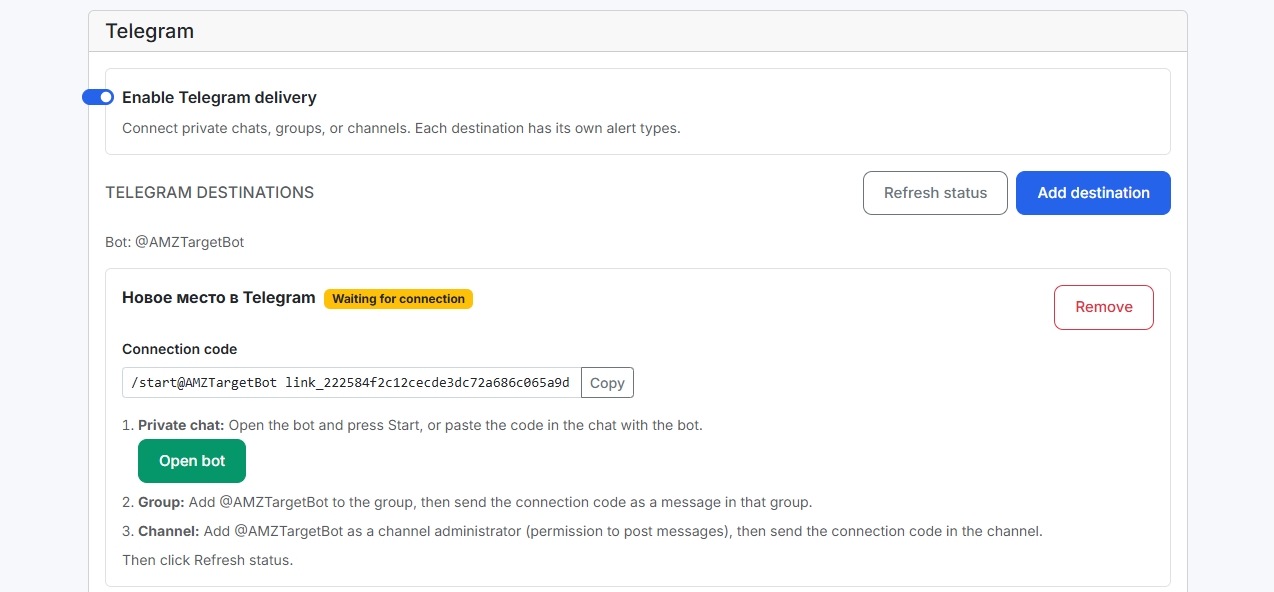
Connect the bot with a code in a DM, a team group, or a channel where it is an admin.
Email without a cap
Add as many inboxes as you need. A new inbox starts with the key events on; change them any time.
Quiet start in Telegram
A new Telegram destination starts with all alerts off — turn on only what you are ready to act on.
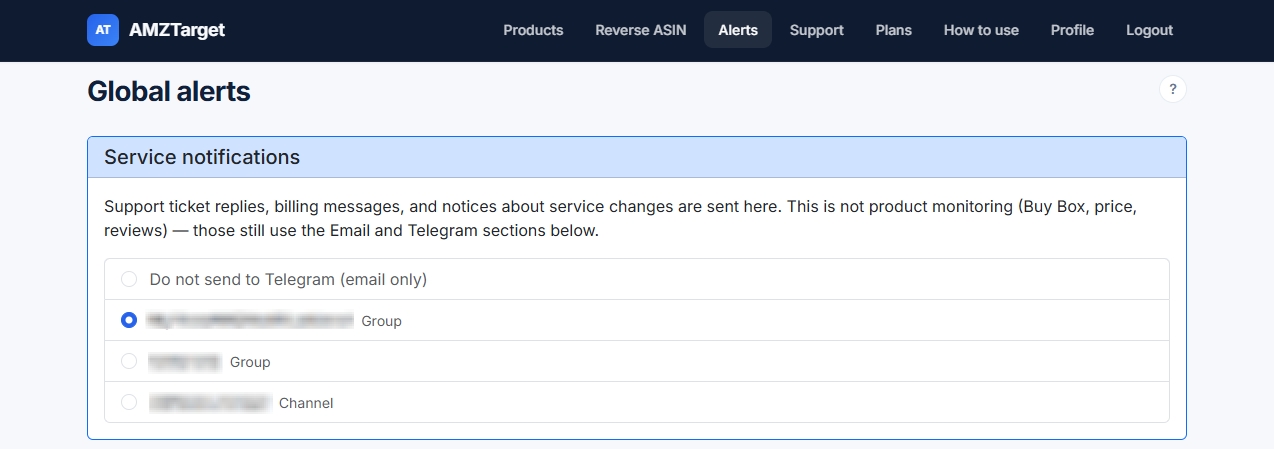
Service messages apart
Support replies and billing go to a separate channel and never mix with product alerts.
What it looks like in the app
Real AMZTarget screens with product names blurred. Click a screenshot to enlarge it.
Up and running in 5 minutes
No integrations and no Seller Central exports — just an ASIN and a couple of settings.
-
1
Add an ASIN
The first check saves a baseline: sellers, price, Buy Box, content, and reviews.
-
2
Connect channels
Add email inboxes and Telegram chats in Alerts. The bot connects with a one-time code.
-
3
Pick events per channel
Urgent ones to the on-call group, content and reviews to email. Give key ASINs their own rules.
Honest limits
So what you expect matches what you will see in the app.
- Alerts follow scheduled checks, not a live feed: at 12 checks a day an event arrives no later than 2 hours after it happens.
- Rank changes are not an alert type yet — follow them in the keyword table (Δ1/Δ7) and on charts.
- Review alerts (new reviews and review mentions) are included from Starter.
- Telegram chats per account depend on the plan: Free 1, Starter 20, Growth 60, Pro 150. Email inboxes are not capped.
What else is in AMZTarget
One app, one plan: the tools below work together and are included in the subscription.
Plans: Telegram channels, review alerts, and check frequency
For alerts, what matters is how many Telegram chats you can connect, whether review events are on, and how often listings are checked. Each is highlighted in every plan.
Free
- 1 product
- 5 keywords
- 1 check/day (12/day first 14 days)
- 1 reverse ASIN/day
- No repricer
- Review alerts from Starter
- 1 Telegram channel
Starter
- 20 products
- 200 keywords
- Up to 6 checks/day
- 10 reverse ASIN/day
- Schedule repricer
- Review monitoring
- 20 Telegram channels
Growth
- 60 products
- 600 keywords
- Up to 12 checks/day
- 20 reverse ASIN/day
- Schedule + competitor repricer
- Review monitoring
- 60 Telegram channels
- 3 team seats
Pro
- 150 products
- 2000 keywords
- Up to 24 checks/day
- 50 reverse ASIN/day
- Schedule + competitor repricer
- Review monitoring
- 150 Telegram channels
- 10 team seats
Prices in USD. Paid plans are billed by Paddle.com (Merchant of Record). Cancel anytime in your account. 14-day refund rights: see Refund Policy.
Payments are processed securely by Paddle. Refunds
Frequently asked questions
Further reading
Connect your first chat in five minutes
Add an ASIN, send the bot a code, pick the events. The next change lands where it should.
Free: 1 product, 5 keywords, 14 days at up to 12 checks a day. No credit card.