Your Amazon price on a schedule — or one step from your competitor, within your bounds
Plan price changes for a date and time, or pick a competitor ASIN: when its price changes, AMZTarget sets yours to their price plus your delta and never goes past your min and max. Updates go through the official Amazon SP-API.
- Official Amazon SP-API
- Min and max price bounds
- History of every price change
Manual repricing always runs late
Prices need to change at night, on weekends, and the moment a competitor moves — exactly when nobody is at Seller Central.
Promos start at midnight
A sale for Friday evening or the end of Prime Day means setting an alarm — or starting hours late.
The competitor moved first
They cut the price in the morning; you notice in the evening. The day’s sales went to their offer.
A race to the bottom
Following a competitor by hand without a floor ends in a margin you didn’t plan for.
Two modes — pick the one for this ASIN
Only one mode is active for a product at a time. Switch between them without re-entering the SKU.
Planned prices for a date and time
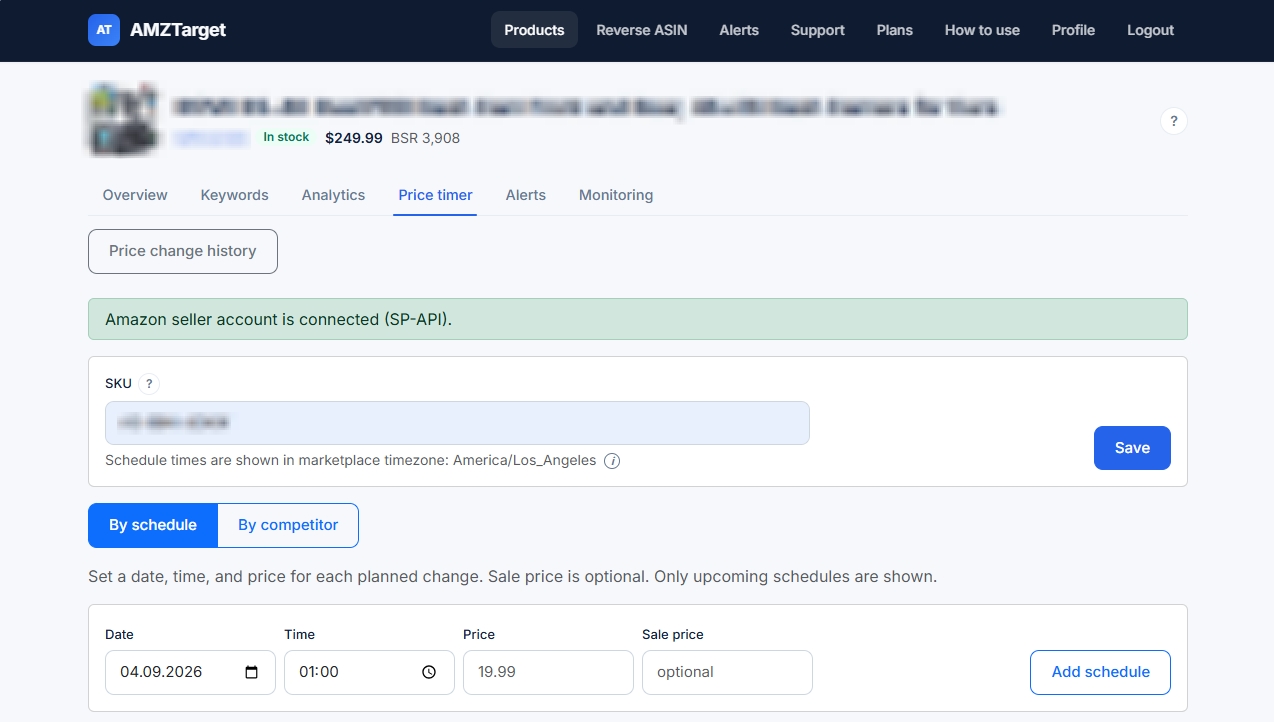
Add rows with a date, time, price, and an optional sale price. Times are in the marketplace time zone; only upcoming rows are listed.
Follow a competitor with your delta
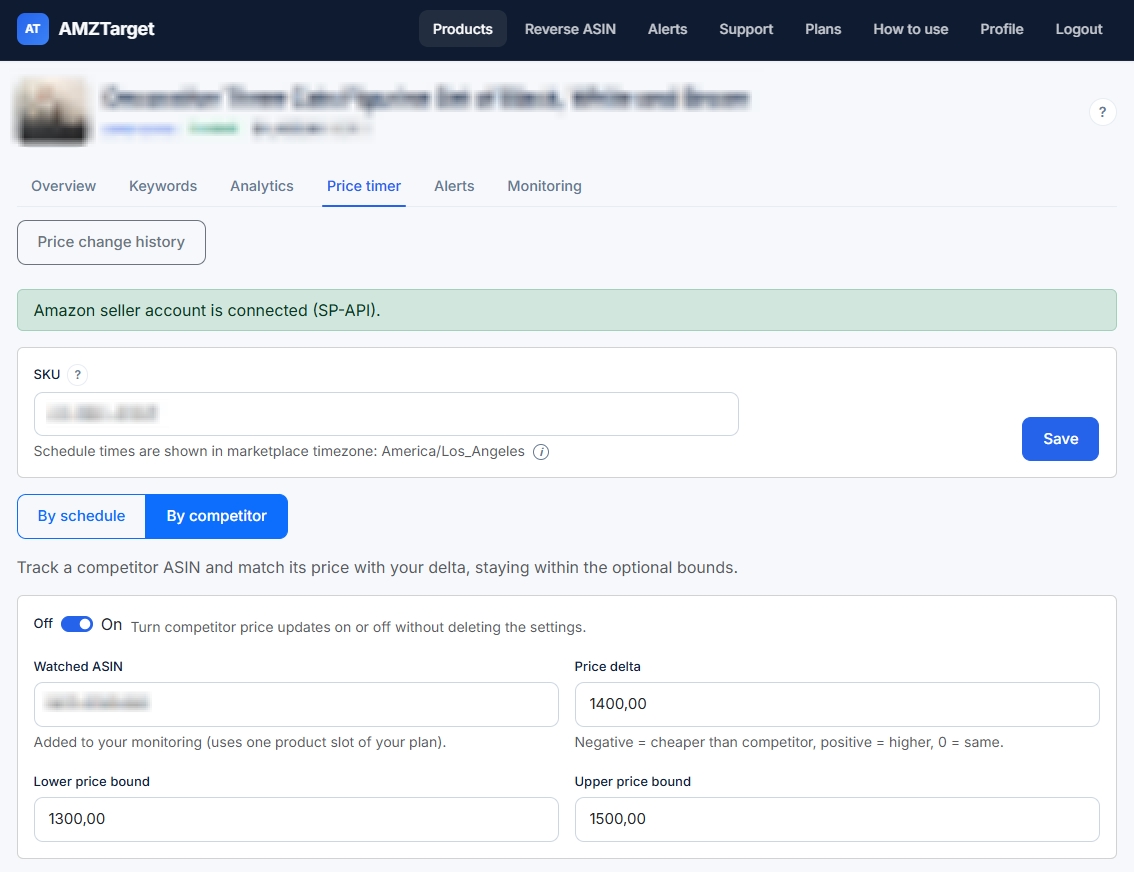
Choose the ASIN to watch and a delta: negative is cheaper, positive is higher, zero is the same price. Optional min and max keep you inside your margin. On/Off pauses it without deleting the settings.
Change the numbers: this is the same rule the repricer applies.
History of every change
Price change history lists every price that was sent, with the date and time in the marketplace clock. Filter it by dates.
SKU, not ASIN
The price is set for your offer’s seller SKU. FBA and FBM offers of one ASIN have different SKUs — choose the one to reprice.
Marketplace time zone
Schedules use the marketplace clock: the form names the time zone and the app header shows the current marketplace time.
Pause in one click
Stop monitoring for a product pauses checks, alerts, and the repricer until you resume.
Where it pays off
Simple rules that remove routine work.
Weekend and holiday promos
Set the sale price for Friday 18:00 and the regular price back for Monday 00:00 — once.
Stay just below the main rival
Delta −0.50 with a floor at your minimum margin: cheaper than them, but never at a loss.
Rise when they rise
When the competitor raises the price, yours follows up to your upper bound — margin you would otherwise miss.
What it looks like in the app
Real AMZTarget screens with product names blurred. Click a screenshot to enlarge it.
Up and running in 5 minutes
No integrations and no Seller Central exports — just an ASIN and a couple of settings.
-
1
Add an ASIN
Add your product; monitoring and alerts start right away, on any plan.
-
2
Connect Amazon
In Price timer, authorize your seller account through Login with Amazon and enter the offer SKU.
-
3
Pick a mode
Add schedule rows, or set the competitor ASIN, delta, and bounds.
Honest limits
So what you expect matches what you will see in the app.
- The repricer needs your seller account connected through SP-API. Monitoring and alerts work without it.
- Competitor mode reacts when a scheduled check sees the competitor’s price change — speed depends on your check frequency.
- The rule is simple: competitor price plus a fixed amount, within min and max. No percentages and no Buy Box algorithm.
- The watched competitor ASIN is added to your monitoring and uses one product slot.
What else is in AMZTarget
One app, one plan: the tools below work together and are included in the subscription.
Plans: repricer modes and products
Scheduled prices start with Starter; following a competitor needs Growth or Pro. Free covers monitoring and alerts without the repricer.
Free
- 1 product
- 5 keywords
- 1 check/day (12/day first 14 days)
- 1 reverse ASIN/day
- No repricer
- Review alerts from Starter
- 1 Telegram channel
Starter
- 20 products
- 200 keywords
- Up to 6 checks/day
- 10 reverse ASIN/day
- Schedule repricer
- Review monitoring
- 20 Telegram channels
Growth
- 60 products
- 600 keywords
- Up to 12 checks/day
- 20 reverse ASIN/day
- Schedule + competitor repricer
- Review monitoring
- 60 Telegram channels
- 3 team seats
Pro
- 150 products
- 2000 keywords
- Up to 24 checks/day
- 50 reverse ASIN/day
- Schedule + competitor repricer
- Review monitoring
- 150 Telegram channels
- 10 team seats
Prices in USD. Paid plans are billed by Paddle.com (Merchant of Record). Cancel anytime in your account. 14-day refund rights: see Refund Policy.
Payments are processed securely by Paddle. Refunds
Frequently asked questions
Further reading
Start with the ASIN you reprice most often
Add it for free and watch the competitor’s price. When you’re ready, connect Amazon and turn on the rule.
Free: 1 product, 5 keywords, 14 days at up to 12 checks a day. No credit card.