Lost the Buy Box on Amazon? How to Find Out Why and Win It Back
Your listing is live, your price hasn't changed, and yet orders have slowed down. When you open the product page, the Add to Cart button belongs to someone else, or there's no button at all, just "See options". You've lost the Buy Box.
A hijacker isn't always the cause. More often it's something specific and fixable: a price above a reference price, an FBA stockout, a slower delivery promise or a pricing-error flag. This guide covers how Amazon picks the Featured Offer in 2026, how to find which cause applies to you, and what to fix first.
What the Buy Box is in 2026 (and what changed this year)
Amazon now calls it the Featured Offer. The area near the top of the product page with Add to Cart and Buy Now is the Offer Display, which can contain one or more Featured Offers; other offers appear under "Other sellers on Amazon" (Amazon: Featured Offer guide). Sellers still say "Buy Box", and so will we. Two facts from Amazon frame everything below:
- Selection criteria. Amazon says it picks the Featured Offer using criteria such as competitive pricing, delivery speed and performance. Being considered doesn't guarantee being featured.
- The seller eligibility step is being removed. In July 2026 Amazon announced that it would remove seller eligibility requirements for the Featured Offer, rolling out gradually and completing by the end of 2026 (Seller Forums announcement). Amazon used to screen sellers on performance first, then rank their offers. The screen goes; the ranking stays.
So "my account isn't eligible" explains less than it used to, while offer-level reasons (stock, price, delivery) still apply.
Why you lost the Buy Box: the common causes
1. You ran out of stock (or your FBA stock isn't available yet)
Amazon says an out-of-stock offer can't become featured. If your sellable FBA units hit zero, or a shipment is still being received, the Buy Box goes to whoever still has stock, which can be a reseller, a slower FBM offer or a hijacker.
2. Your price is "too high", even if no one undercut you
"Price too high" isn't only about other sellers on the listing. Amazon also compares your offer with the competitive external price (the price at other major retailers) and with recent prices in its own store. Raise your price after a promotion, or let another retailer undercut you, and you can lose the Featured Offer even as the only seller. Amazon judges the total price: item plus shipping.
3. Your price is "too low"
To protect sellers from typos, Amazon may make an offer ineligible and ask you to confirm a suspected pricing error. An aggressive repricer, or $24.99 typed as $2.49, can trigger it.
4. Someone else's offer is simply better
Amazon says offers with fast, free shipping and narrower delivery windows are more likely to be featured. When offers are close, the Featured Offer can rotate, so you hold it only part of the time. If the winning seller is unknown to you or ships something that isn't your product, follow our guide to detecting and removing listing hijackers.
5. Amazon itself is selling on the listing
"Ships from and sold by Amazon.com" means you're competing with Amazon Retail. The same criteria apply, but its price and delivery are hard to beat. Compete where margin allows, differentiate (bundles, visible branding), or shift volume to ASINs Amazon doesn't sell.
6. Your delivery promise got slower
A switch to FBM, longer handling time, a new shipping template or a peak-season carrier slowdown can push your delivery date past a competitor's. Amazon says fulfilling orders yourself can be just as effective as FBA, so what counts is the delivery promise, not the label.
7. Order experience and account health problems
Amazon asks sellers to ship the correct, undamaged, authentic item in the condition shown, and points to Account Health and Voice of the Customer for monitoring. "Performance" is still a selection criterion, so defects, late shipments and policy warnings can still cost you in the ranking.
8. No one has the Buy Box ("See options")
"See options" instead of Add to Cart means, per Amazon, there may be no offers eligible to be featured, often called a suppressed Buy Box. It's usually price (every offer above the reference price) or stock, and it hits every seller on the listing.
How to diagnose a lost Buy Box: step by step
Go from quickest to slowest; most cases are solved by step 3.
Step 1: Look at the page as a US shopper would
Set a US delivery ZIP code and note who holds the Featured Offer, their total price, delivery date and fulfilment (FBA, FBM or Amazon). Compare every offer in "Other sellers on Amazon" with yours. Seeing "See options"? Jump to step 3.
Step 2: Check your offer in Manage All Inventory
In Seller Central, open Inventory → Manage All Inventory. Amazon says the "Price and shipping costs" column shows whether you're the Featured Offer, and View reference and business prices shows the competitive external price and the lowest price in the store. Many sellers also switch on a Featured Offer eligibility column under Preferences. Confirm the SKU is active and has units.
Step 3: Open Pricing Health
Open Pricing → Pricing Health. Amazon says the Pricing Opportunities tab lists offers not currently eligible to be featured; offers deactivated for a suspected pricing error appear under Inactive Offers, where you can confirm or fix the price. If your ASIN is listed, the cause is price.
Step 4: Check stock and inbound shipments
Compare available with inbound and reserved FBA units. Stock in your warehouse but zero sellable units at Amazon still counts as out of stock.
Step 5: Review your delivery settings
For FBM, check handling time and shipping templates, especially recent edits.
Step 6: Check Account Health
Open Performance → Account Health for new warnings, deactivations or rising defect and late-shipment rates.
Step 7: Measure how much of the Buy Box you're actually losing
In Reports → Business Reports → Detail Page Sales and Traffic, check Featured Offer percentage: the share of page views where your offer was featured. A sudden drop on one ASIN suggests a listing cause; a slow slide across many suggests pricing or account-wide issues.
Quick diagnosis
- "See options", no Add to Cart. No offer is eligible, usually price versus the external reference or stock. Check Pricing Health and Manage All Inventory.
- Another seller is featured at a lower total price. You are outpriced. Decide on price with a floor (see below).
- Another seller is featured at the same price. Faster or more certain delivery, or rotation. Check delivery settings, FBA, or Seller Fulfilled Prime.
- "Ships from and sold by Amazon.com". Amazon Retail is on the listing. Compete on price where it is viable, differentiate, or diversify.
- Your offer is missing from the offer list. Out of stock or the offer is inactive. Check inventory and Pricing Health for a pricing error.
- An unknown seller with a suspicious product. Possible hijacker. Follow the hijacker guide.
How to win the Buy Box back
Fix eligibility first
If your offer is ineligible, nothing else matters yet. Bring the total price in line with external or recent prices, confirm or correct a suspected pricing error, and restock. That lets you compete again; it doesn't guarantee a win.
Compete on delivery, not only on price
A fast, reliable delivery promise often beats a price cut: send inventory to FBA, shorten FBM handling time, use faster shipping templates where margin allows, or qualify for Seller Fulfilled Prime.
Set a repricing floor before you touch the price
Chasing the lowest offer until you sell at a loss is the worst way to win it back. Before repricing, define:
- Floor: landed cost + Amazon fees + the minimum margin you accept. Below it, you'd rather not have the Buy Box.
- Ceiling: roughly where you stop being competitive with external reference prices, so a repricer can't push you into "price too high".
- Step: your move relative to the competitor, e.g. $0.50 below or an exact match.
Amazon's Automate Pricing tool and third-party repricers, including AMZTarget's repricer, both work with rules like these. If the cheapest offer is a counterfeiter, report it and hold your price rather than match it.
Protect your stock position
Set reorder points from real sell-through and FBA lead time, with a buffer before Q4 and sale events. Winning the Buy Box back after a stockout takes as long as the restock.
Clean up account health
Resolve policy warnings, cut cancellations and late shipments, answer buyers promptly. It's slow, but performance counts.
Accept rotation on shared listings
On multi-seller ASINs with similar offers, below-100% Featured Offer percentage is normal. Aim for a healthy share at a profitable price.
Monitoring: find out the same day, not at month-end
Most of the damage comes from not noticing: you spot it in Business Reports a week later, or a Friday stockout runs all weekend. On important ASINs, track:
- Who holds the Featured Offer, compared against your own seller ID
- Number of sellers on the listing
- Displayed price, including sudden drops
- Stock status ("Currently unavailable")
- Page not found (a broken listing, not a lost Buy Box)
Match check frequency to what a few hours without the Buy Box costs; see how often to check Amazon keyword ranks for the same risk-based logic.
How AMZTarget helps
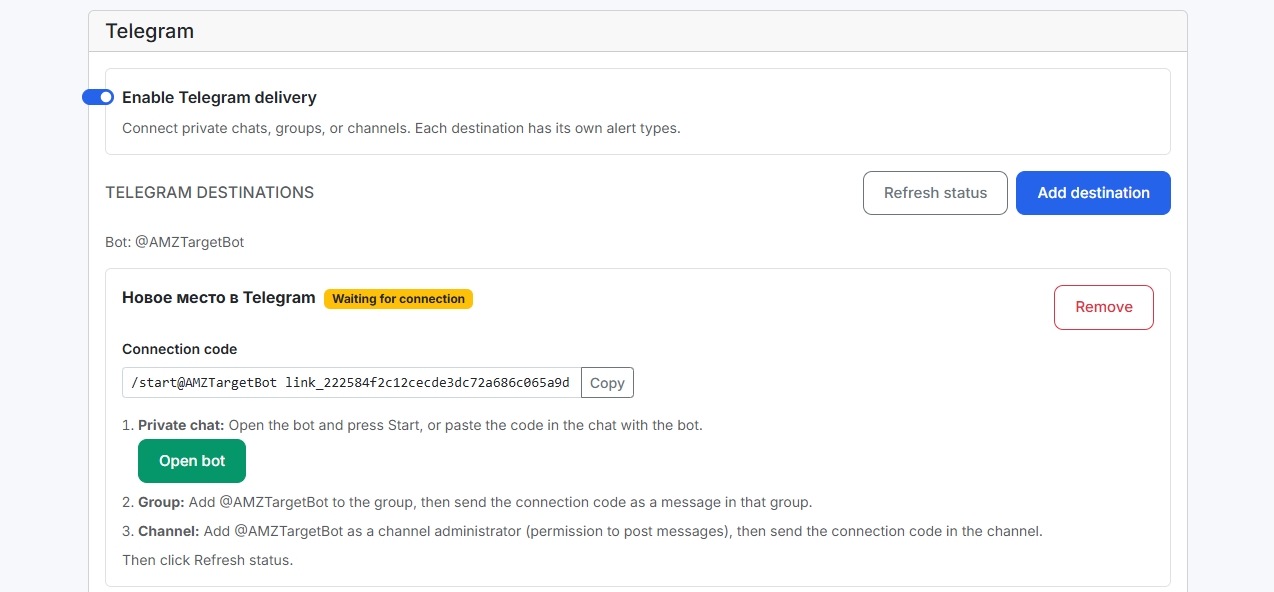
AMZTarget's Buy Box and hijacker alerts watch these signals for any ASIN from the public product page, so no Seller Central access is needed. Add the ASIN and your Merchant ID: each check compares the Featured Offer seller with your ID and alerts you in Telegram (DM, group or channel) or email when you lose it. The same check covers new sellers, price, stock and page-not-found, and you can route each of the 15 alert types to its own chat or inbox. The listing change monitor keeps before/after history, so you can see whether price, sellers and Buy Box changed together.
Alerts go out when the detecting check completes: 1×/day on Free (12×/day for the first 14 days), up to 6×/day on Starter ($19/mo), 12×/day on Growth ($49/mo), 24×/day on Pro ($99/mo). Not instant.
To respond on price, the repricer runs scheduled price changes from Starter, or on Growth and Pro follows a competitor ASIN by a fixed amount (e.g. −$0.50 or a match) within your min/max bounds. It runs per seller SKU during scheduled checks and needs SP-API via Login with Amazon. It uses fixed-amount rules, not percentages or a Buy Box algorithm. Watch rival offers with competitor tracking.
Try it on your most important ASIN. Free plan, 1 product, 5 keywords, Telegram and email alerts, no credit card. Add your Merchant ID and enable the Buy Box trigger on Buy Box alerts.
Lost Buy Box checklist
- Check the page with a US ZIP: who's featured, at what total price and delivery date?
- Manage All Inventory: offer active, in stock, featured? External reference price?
- Pricing Health: ineligible or suspected pricing error?
- Sellable FBA units, not just inbound.
- FBM handling time and shipping templates.
- Account Health warnings or rising defects.
- Featured Offer percentage in Business Reports.
- Unknown seller? Follow the hijacker process.
- Reprice only with a floor and ceiling.
- Set alerts so the next loss reaches you the same day.
FAQ
Why did I lose the Buy Box when I'm the only seller?
Usually it's price or stock. Amazon can make an offer ineligible to be featured when its price is too high compared with reference prices, including the competitive external price at other retailers, or when it suspects a pricing error. Check Pricing Health and Manage All Inventory. If the page shows "See options", no offer is currently eligible.
What does "See options" instead of Add to Cart mean?
Amazon says it means there may be no offers eligible to be featured. Common reasons are out of stock, price too high or price too low (suspected pricing error). It applies to the listing as a whole, so every seller on the ASIN is affected.
Does FBA win the Buy Box over FBM?
Not automatically. Amazon says that, with other factors equal, FBA and merchant-fulfilled offers are equally likely to be featured, and that fulfilling orders yourself can be just as effective. FBA tends to help because it often gives a faster, more predictable delivery date. A slow FBM delivery promise will lose against a faster offer.
Has Amazon removed Buy Box eligibility requirements?
Partly. In July 2026 Amazon announced it is removing seller eligibility requirements for the Featured Offer, with the rollout completing by the end of 2026. It isn't changing how the Featured Offer is selected: competitive pricing, delivery speed and performance still apply, and offer-level reasons such as stock and price still make an offer ineligible.
How do I check my Buy Box percentage?
In Seller Central, go to Reports → Business Reports → Detail Page Sales and Traffic and look at Featured Offer percentage by ASIN or child item. To find out the same day rather than in a report, use a monitoring tool that compares the Featured Offer seller with your Merchant ID on a schedule.
Can I get Buy Box alerts without giving a tool Seller Central access?
Yes. Monitoring tools that read public product pages, such as AMZTarget, can tell when the Featured Offer moves away from your Merchant ID, as well as changes in price, seller count and stock, without account access. You only need SP-API access if you want the tool to change your prices automatically.