
Free Amazon rank tracker: what you can learn before upgrading to a paid plan
You enter your main query in Amazon search, scroll through the results, and still cannot tell whether your product has really dropped or Amazon is simply showing personalized results. The next day, a colleague checks the same phrase on another laptop and reports a completely different rank. Your spreadsheet ends up with numbers that have no consistent standard, exact time, or history.
A rank tracker should solve one simple problem: provide a regular and honest picture of your listing. Before signing up, the key question is: “Will this data help me make a specific decision about my product right now?”
Why does manual rank tracking in spreadsheets fail?
Amazon search results are constantly changing, not a static storefront. Results depend on the city, device, category, FBA inventory, advertising, and Amazon's own internal tests. When you check ranks manually, you face 4 problems:
- There is no consistent standard. One employee counts sponsored placements, another skips them, and a third uses the mobile version.
- The schedule breaks down. People start checking Amazon only after sales have already fallen, rather than at the same time every day.
- Numbers have no context. A rank of #35 today says very little. Is it a random jump, the start of a decline, or is the product moving toward page one from #70?
- Variations are missed. Amazon often shows another color or size from your product family in search. If you check only one exact ASIN, you may decide the product is missing even though shoppers can see a related variation.
Automated monitoring removes this confusion. It visits the page on a schedule and collects data using the same rules every time.
What should a free tracker actually measure?
Five accurate, relevant phrases are more useful to a business than a hundred random keywords that no one reviews. These are the main metrics:
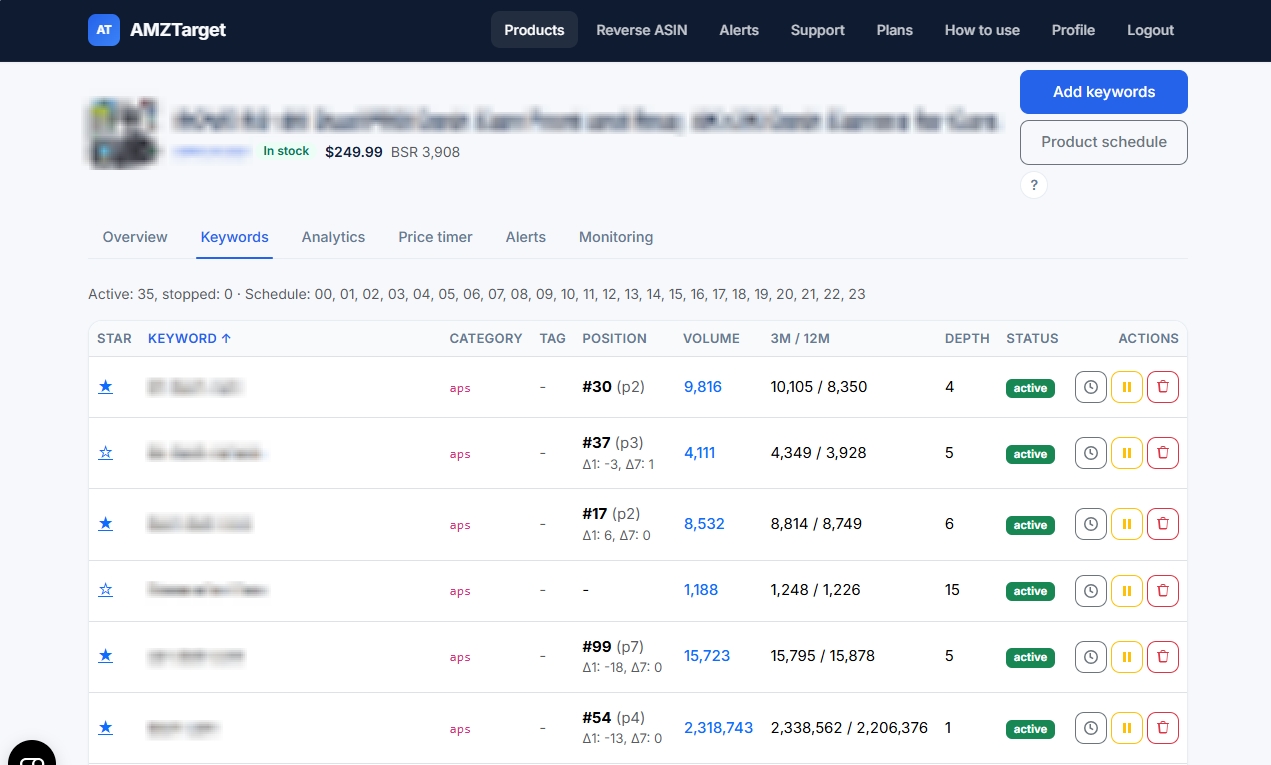
- Exact rank and search-results page. You need to know both the position and the page. Dropping from page 1 to page 2 is an urgent warning, while moving from #5 to #8 on the first page is normal variation.
- Δ1 and Δ7 changes. These show movement over the last 24 hours and 7 days. This helps you distinguish daily “noise” from a gradual decline.
- Indexing status. The service should clearly distinguish between “Amazon does not show your product for this phrase at all,” meaning it is not in the index, and “The product is indexed but ranks far down,” meaning it was not found on the first few pages.
- Variation tracking (Parent/Child). If a related size or color from your product family appears in search, the system should count that rank instead of marking the product as “not found.”
- Search volume and suggestions. Estimated Volume, the 3m/12m trend, and Amazon suggestion Depth help you decide which keywords deserve the limited free slots.
What does the AMZTarget Free plan include?
AMZTarget Free is an ongoing plan with no requirement to add a card and no hidden charges:
- 1 tracked product
- 5 keywords
- 1 check per day on the ongoing plan
- Up to 12 checks per day during the first 14 days of the trial
- 1 Reverse ASIN run per day
- 1 month of data history
- Email and Telegram alerts
- No card required
The higher frequency of up to 12 checks per day is available for the first two weeks so that you can see changes within a day and evaluate the service. The account then moves smoothly to 1 check per day and remains free.
For each keyword, you can see its current rank, search-results page, and Δ1/Δ7 changes. You can mark important keywords with a star so that they are highlighted first on the charts.
How does AMZTarget handle variations such as colors and sizes?
When adding an ASIN, simply leave “Variations from listing” enabled. AMZTarget will load the child ASINs in the product family. When the service checks a keyword, it counts the rank if any of these variations appears in search.
This prevents false alarms. But remember that variations do not use up your product slots. They count as one product family with a shared set of 5 keywords. If you need separate, detailed monitoring for a specific child ASIN with its own alerts, you can add it separately.
How should you choose 5 free keywords?
Do not fill all 5 slots with nearly identical phrases. Build a precise diagnostic set:
- The main general query, such as
stainless steel water bottle. - A keyword with a specific attribute, such as
insulated water bottle 32oz. - A use-case query, such as
gym water bottle for men. - A branded query, if you are promoting a brand.
- A test keyword, meaning a phrase for which you are currently changing the bullet points or launching PPC.
Use Reverse ASIN: analyze your listing, review search volume and Amazon suggestions, then send the 5 best phrases to tracking in one click.
A 7-step test: getting the most from the Free plan
To understand the service's value during the first week, follow these 7 simple steps:
- Step 1. Set a specific goal. Create an account and define your question. For example: “Is the product indexed for the 5 main keywords, and which pages does it appear on?”
- Step 2. Add the product and enable variations. Enter your main ASIN and make sure “Variations from listing” is enabled.
- Step 3. Collect 5 keywords. Run Reverse ASIN on your listing, choose 5 relevant phrases, and click “Track.”
- Step 4. Set up Telegram notifications. Connect the bot and select a chat for alerts so you do not need to open the dashboard every hour.
- Step 5. Review the statuses. Check the first results. Separate the data into products with an exact rank, products that are “not in the index,” and checks where data is still being collected.
- Step 6. Compare the charts. In Analytics, see how rank movements over the last few days line up with changes in price or BSR.
- Step 7. Make a decision. At the end of the week, decide whether to change the bullet points, buy more advertising for keywords that have dropped out, or leave the current ranks as they are.
Limitations of the Free plan, with no fine print
The Free plan is ideal for getting started and protecting one main product, but it has natural limits:
- 1 check per day after the 14-day trial may miss brief rank changes within the day.
- 5 keywords are not enough for in-depth work with a large keyword set.
- 1 month of history is not enough to analyze long-term seasonality over the past year.
You DO NOT NEED to connect Seller Central through SP-API to track ranks, find keywords with Reverse ASIN, or receive alerts. Everything works with public data. SP-API is needed only for the paid automatic price-change module, Price Timer.
If you eventually need to monitor more products, add 100+ keywords, run checks up to 24 times a day, or track reviews, you can always switch to one of the paid plans.
The key takeaway
Start with one product and five phrases. In a week, you will build a clear routine: regular checks, Telegram reports, and quick decisions based on accurate Amazon data.
Start free without a card · Compare plans · Set up keywords · Set a schedule · Learn about variations · Try Reverse ASIN