
How often should you check Amazon keyword ranks?
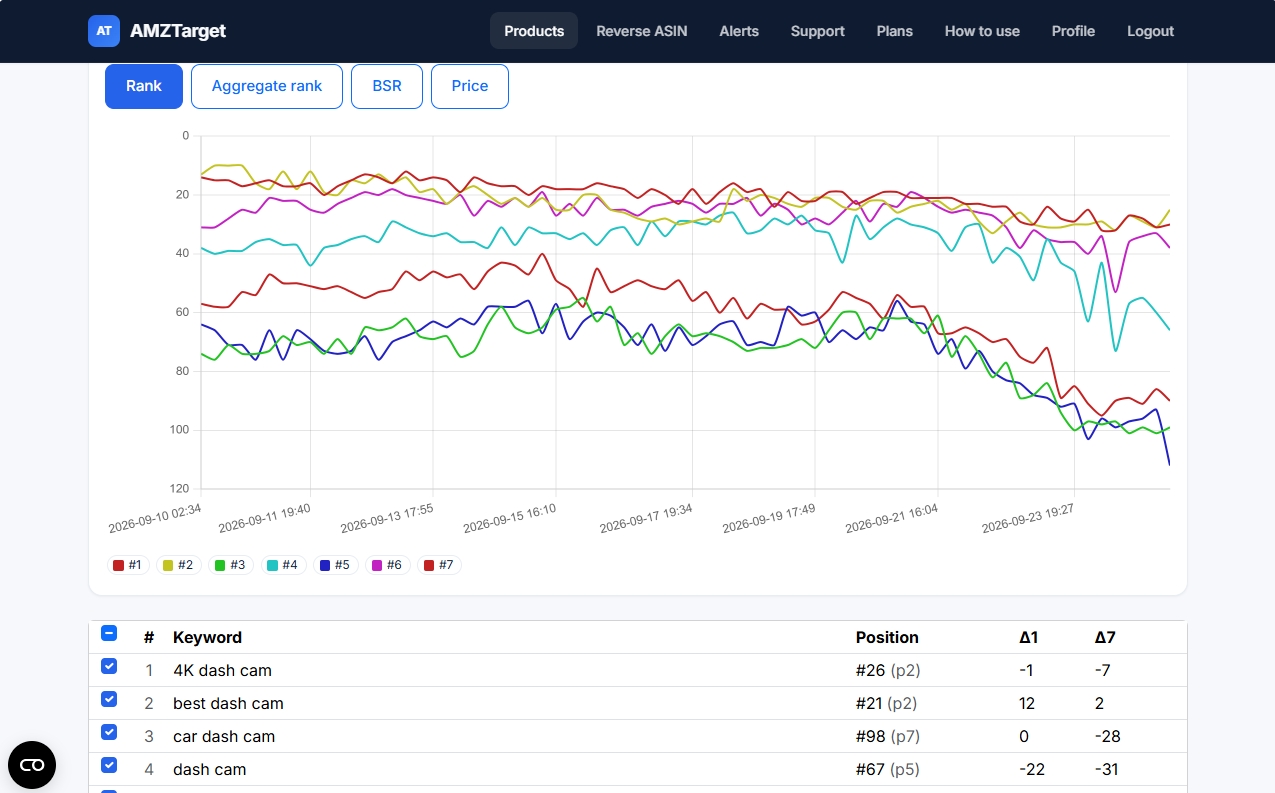
Imagine this: sales have dropped for no obvious reason. You search on Amazon and discover that your main keyword has fallen from the first page to the third. But the last entry in your rank spreadsheet is a week old. You know the current rank, but you have no idea whether the drop just happened or the product has been near the bottom for 5 days. You also do not know what caused it.
So how often should you check ranks? For a stable product that has been selling for a long time, once a day is enough. But if you are launching a new product, running a promotion, changing bullet points, or recovering inventory after going Out of Stock, you need to watch more closely. The main rule is: choose the least frequent schedule that still gives you enough time to respond.
Why do manual checks and spreadsheets fail?
Typing keywords into Amazon search by hand gives you an illusion of control. This approach has three problems:
- There is no consistent standard. Search rank depends on the city, selected marketplace, category, and whether you count variations such as colors and sizes. Manual checks can produce different results every time.
- The picture is misleading. If you record a rank of 15 on Monday and 40 on Friday, you cannot see what happened during the week. The product may have declined gradually, or it may have dropped within an hour after an unsuccessful title edit.
- Decisions become emotional. When sellers see a bad number during a random check, they often panic and change the price, rewrite the content, or adjust advertising. But the number may simply reflect a temporary Amazon search glitch.
Scheduled monitoring keeps a history. You see a trend rather than just a number, so you can make decisions based on facts instead of emotion.
What does check frequency actually give you?
The check frequency in the service is simply the interval between the system's visits to the search-results page:
- Once a day - a check about every 24 hours.
- 6 times a day - a check every 4 hours.
- 12 times a day - a check every 2 hours.
- 24 times a day - a check every hour.
The business question is: “How long can a problem go unnoticed without hurting sales?” If reviewing the trend during your morning team call is enough, one check a day will do. If a promotion or launch is live, it is better to check ranks every 2–4 hours.
AMZTarget lets you set the frequency flexibly: use the highest frequency only for the most important keywords and leave the rest on the basic schedule.
Which keywords should you check more often?
There is no reason to use up your limits by checking absolutely everything 24 times a day. Divide your keywords into groups:
- Main commercial keywords. These phrases bring in most of your organic sales. Track them at the highest frequency available to you.
- Launch keywords. These are keywords you are targeting while growing a new product or recovering ranks after a period of inactivity. More frequent checks help you see the first movement in search results right away.
- Diagnostic and closely related keywords. These queries help you check indexing or category placement. One check a day is usually enough.
- Long-tail keywords. These are low-volume phrases. There is simply no reason to check them more than once a day.
In AMZTarget, you can mark your main keyword with a star so that it always stands out on charts and receives special attention.
Which metrics should you review besides rank?
The number “15” in a column does not tell you much by itself. Context matters:
- Search-results page. Ranks #21 and #48 are different, but both may appear on page 2. AMZTarget shows both the rank and the page number (
p1,p2, and so on). - Δ1 and Δ7 changes. Δ1 shows movement over the last 24 hours, while Δ7 shows the weekly trend. This helps you distinguish daily noise from a gradual decline.
- Variation tracking (Parent/Child). Amazon often shows a child ASIN - another color or size - instead of the parent. If you enable “Variations from listing,” the service counts the rank when any product in the family appears in the results.
- Analytics charts. In AMZTarget, you can view rank, price, and BSR trends on the same chart. For example, you can immediately see how a price increase 3 days ago affected organic ranking.
Note: The service clearly distinguishes “Not in search index,” which means Amazon truly does not show your ASIN for the phrase, from a dash, which means the check has not finished yet. Do not confuse them.
Which schedule should you choose for different tasks?
Use these simple scenarios:
- Stable product: 1 check per day.
- Product under optimization, with active PPC and content work: 6 checks per day, or every 4 hours.
- Launch, sale, or photo/title change: 12 checks per day, or every 2 hours.
- Short high-risk period, such as the Super Bowl, Prime Day, or an aggressive competitor attack: 24 checks per day, or every hour.
A 7-step test: finding the right frequency
Instead of guessing the best frequency, run this simple 7-step test:
- Step 1. Define the goal. Choose one important ASIN and define the task. For example: “See how changing the photos affects ranks over 3 days.”
- Step 2. Choose 5 keyword phrases. Sign up for AMZTarget and add 5 different keywords: 2 main keywords, 1 launch keyword, 1 diagnostic keyword, and 1 long-tail keyword. If you do not know what to add, use Reverse ASIN.
- Step 3. Enable variations. In the product settings, enable Variations from listing and record the starting ranks: page, position, and Δ1.
- Step 4. Set a high frequency. The free trial, which covers the first 14 days, includes up to 12 checks per day. Set the highest frequency for your product.
- Step 5. Watch for 2–3 days. Follow the charts. Compare rank changes with advertising spend, price changes, and BSR.
- Step 6. Assess whether the frequency is useful. Ask yourself: “Did checking every 2 hours tell me anything useful, or would one check every 4 hours have been enough?”
- Step 7. Set a permanent schedule. Keep the higher frequency only for 1–2 main keywords and move the others to the regular daily schedule.
You will end up with a clear working schedule for each type of product.
Security and access: what you need to know
You DO NOT NEED Seller Central access through SP-API to track ranks, use Reverse ASIN or Analytics, or set a schedule. All data comes from public Amazon search results.
SP-API is required only for the automatic price-change module, Price Timer. Rank analysis works independently and safely for any ASIN on Amazon.
The key takeaway
Do not chase endless checks just to produce attractive charts. Start with daily monitoring, increase the frequency to 6–12 times a day during active tests or launches, and then return to the basic schedule.
Start a free seven-day test · Compare plan frequencies · Learn about keyword tracking · Set check hours · Open the Analytics guide · Find phrases with Reverse ASIN