
The Silent Leak: Why Sellers Notice Ranking Drops Too Late
Amazon does not warn you about problems in advance. On Friday evening, a competitor quietly appears on your listing. On Sunday, an important search term drops off the first page. Then on Monday, someone on your team or Amazon itself edits the description, and important keywords disappear from the text. Amazon will not send you a text message - you will simply notice that sales fell over the weekend for some reason.
Most sellers do not notice until Tuesday, when they finally get around to checking their listings. But the problem has already happened, and the damage has been building for days.
The delay itself is the main problem. Let's look at how to reduce it to a minimum.
Calculate your losses
Imagine a product that brings in $200 a day. A hijacker appears on the listing on Friday evening and takes the Buy Box until Monday morning. For 60 hours, your traffic goes to another seller, costing you about $500 in revenue. And because sales stopped, Amazon's algorithms will start lowering the product's organic rankings the following week as well.
Now use your own numbers. How much does your main ASIN make, and how often do you actually check its listing? If days pass between a problem and its discovery, you are losing a meaningful amount of money.
The logic behind automated monitoring is simple: if a service cuts your response time from 3 days to 2 hours, it pays for itself the first time it catches a problem.
4 problems that are hard to spot manually
Ranking drops. Small fluctuations are normal, but dropping off the first page can destroy sales. If you check rankings once a week, you will only see that they fell. You will not know why: whether a competitor lowered their price, the listing text changed, or the product lost indexing.
Hijackers. Another seller on your ASIN quietly takes your customers. The longer they go unnoticed, the more they earn from your traffic.
Losing the Buy Box. The listing is still there and looks normal, but the Buy button points to another seller or disappears altogether.
Unnoticed edits. The title, images, bullet points, or product details can change because of edits made by Amazon, a content manager, or other sellers. One careless change can remove the keywords that were driving sales.
Manual checks do not work for one simple reason: you cannot watch a listing 24/7.
Simple math: how often should you check a listing?
The time it takes to detect a problem depends directly on how often you check. This is not theory; it is simple math:
- Manual checks "when you remember" - up to a week in the dark.
- Once a day - you could lose up to 24 hours of sales.
- 6 times a day - the maximum delay is about 4 hours.
- 12 times a day - a response within 2 hours.
- 24 times a day - a response within an hour.
In AMZTarget, check frequency depends on the plan: Free - once a day (12 times a day for the first 14 days, so you can see the effect right away), Starter - 6, Growth - 12, and Pro - 24. You simply choose the interval that protects your budget.
Rankings must be accurate, not just a box to tick
If a tracker reports the wrong rank, it does more harm than good. Here is what makes monitoring accurate:
All variations are included. On Amazon, products are often grouped into a variation family, such as sizes or colors. Any child ASIN can appear in search results. AMZTarget automatically pulls in the variations and counts the rank if any product from your family appears in the results. Without this, you may see "not found" while shoppers are choosing your product in another color.
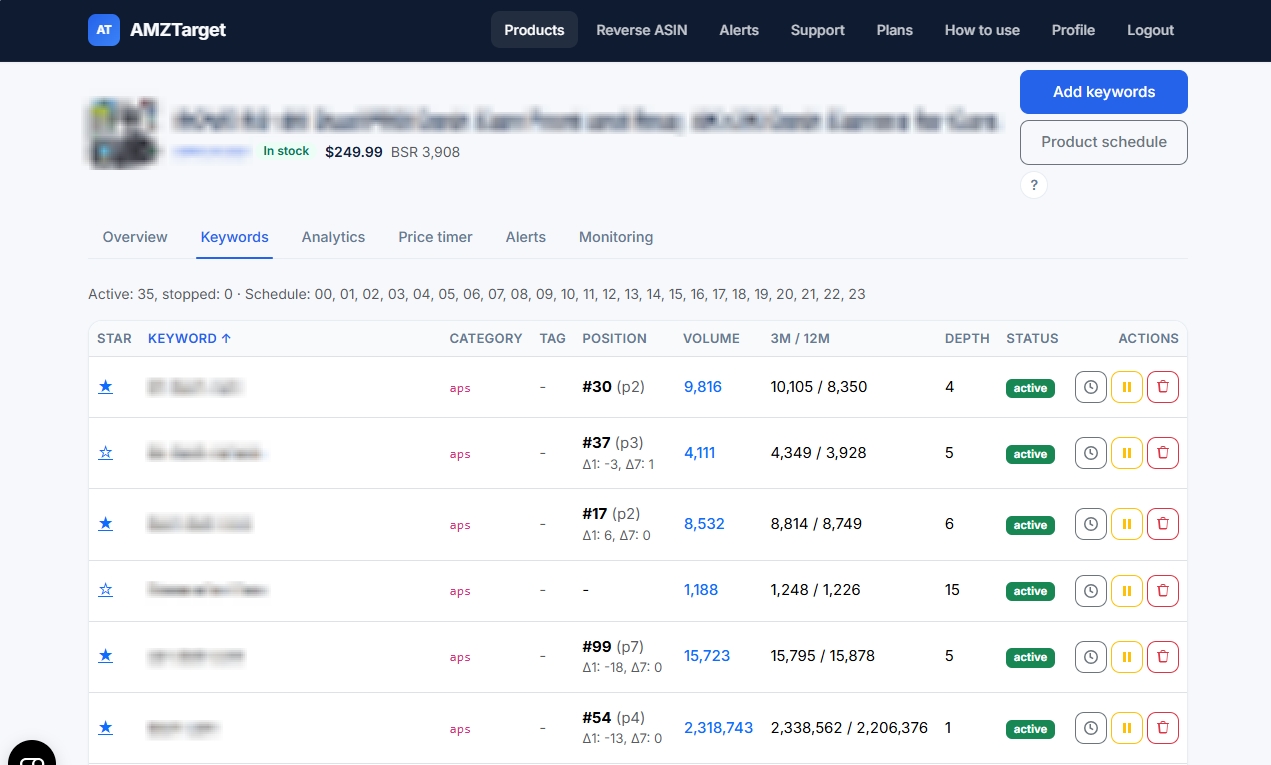
Clear context. For each phrase, you can see its current rank, search results page, and movement over the past day and 7 days. This helps you immediately distinguish a random jump from a troubling trend.
A distinction between "not indexed" and "no data." The service clearly separates cases where Amazon genuinely does not show your ASIN for a keyword from cases where the check simply has not finished yet.
The Analytics tab brings all of this together in clear charts, with rank, price, and BSR on the same timeline. You can immediately see how a price change three days ago affected ranking.
Track only the keywords that matter
There is no point in tracking random phrases. Reverse ASIN quickly extracts search phrases from your listing or a top competitor's listing. The service shows search volume, demand trends over 3 and 12 months, and the depth of Amazon suggestions.
If demand over 3 months is higher than over 12 months, the phrase is growing and is definitely worth tracking. If it is lower, demand is falling or the phrase is seasonal.
You can add the phrases you like to tracking with one click, directly from the report.
Notifications where you will actually see them
Notifications in a dashboard you visit once a week do not work. AMZTarget sends alerts by email and Telegram. Paid plans let you configure routes flexibly: for example, send major problems with your top ASINs to a work Telegram chat and less critical alerts by email.
The service tracks 14 types of events, including losing the Buy Box, a new seller appearing, and changes to the price, images, title, review count, rating, and other details. If you enter your Merchant ID, Buy Box alerts will be personalized: you will know immediately when a competitor has taken the coveted button.
Automatic price changes
Learning about a problem quickly is only half the job; you also need to respond. Price Timer lets you schedule a price change or automatically follow a competitor's price within set minimum and maximum limits. The service sends the new price to Amazon through SP-API.
This is the only feature that requires a connected Seller Account. All other features - rank tracking, listing monitoring, Reverse ASIN, and alerts - work with any public ASIN and require no account access at all.
Get started in 20 minutes
- Set the default marketplace in your profile, then pick the marketplace again when you add the ASIN. Rank checks follow the product, not the header clock.
- Add your main ASIN and select Variations from listing.
- Run a quick Reverse ASIN analysis on your own product and a strong competitor.
- Add 5 to 20 search phrases to tracking. Mark the most important ones with a star.
- Connect the Telegram bot and set up alerts for Buy Box changes, hijackers appearing, and price changes.
- Set the highest check frequency for your main product.
- Enter your Merchant ID so you know exactly when the Buy Box slips out of your hands.
Then let everything run for a week. You will understand the service's value as soon as the first message arrives about a problem you would previously have missed.
What AMZTarget is NOT
It is not a bloated suite of forty modules. The service does not manage advertising or track warehouse inventory. AMZTarget focuses on what matters most: listing health, indexing, rankings, keyword analysis, and fast repricing. Put simply, it gives you a clear, quick answer to the question, "Is everything okay with my listing and sales right now?"
Start with the free plan
The free plan lets you track 1 product and 5 keywords, run 1 Reverse ASIN query per day, and receive alerts in Telegram. For the first 14 days, checks run up to 12 times a day so you can feel the difference right away. No credit card is required.
Paid plans start at $19 per month (pay annually and get 2 months free).
Start monitoring your most important product now and see for yourself how much less stressful it is to run your business when your listing is under control.