
Reverse ASIN keywords: how to turn an Amazon listing into a research plan
You open a successful competitor's Amazon listing and see a great title and bullet points. But the main question remains unanswered: which search queries are shoppers using to find this product, and which of them should you track for your own product?
If you simply copy words from the page, you will end up with a random pile of keywords. If you make up synonyms, the list will get longer without becoming more useful.
Reverse ASIN turns your own or someone else's listing into a clear list of ideas to test. It does not break into competitors' ad accounts or reveal their confidential sales data. Its job is to analyze the listing text, collect Amazon search suggestions, show demand, and help you send the best keywords to regular tracking.
What is Reverse ASIN, and how does it work?
With regular keyword research, you start with a word: you enter “water bottle” and look at the results. With Reverse ASIN, you start with a product: you enter a public product identifier (ASIN) - your own or a competitor's - and the service finds phrases associated with it.
The difference is simple:
- Regular search: “Which products appear for this query?”
- Reverse ASIN: “Which phrases might shoppers use to find this specific product?”
AMZTarget works only with public Amazon data. The service scans the listing title and bullet points, collects Amazon search suggestions based on those words, and loads estimated search volume.
It is important to understand that a keyword appearing in a Reverse ASIN report does not mean the product already ranks near the top for that phrase or advertises on it. It is simply a strong idea. To see whether the product currently appears in search results, you need to track it separately.
Why is collecting keywords from a listing by hand a bad idea?
You can try to pick out keywords manually, but in practice this leads to four common mistakes:
- Missing the shopper's logic. Phrases such as “stainless steel” or “BPA free” describe features. But shoppers often search by use case or problem - such as “gym bottle” or “gift for coach” - and these phrases may not appear in the listing text at all.
- Industry tunnel vision. Your team may call the product a “thermal bottle,” while 90% of Amazon shoppers search for it as a “sports bottle.”
- Messy files. When one spreadsheet contains brainstormed terms, PPC report data, and keywords from competitor listings, you end up with 500 rows and no idea where to start.
- Outdated data. Demand changes from season to season. Without recording the date and exact ASIN, old keyword lists quickly become useless.
The goal of Reverse ASIN is not to collect a million phrases. It is to give you a reason to use, test, or reject each keyword.
Which metrics should you use when choosing keywords?
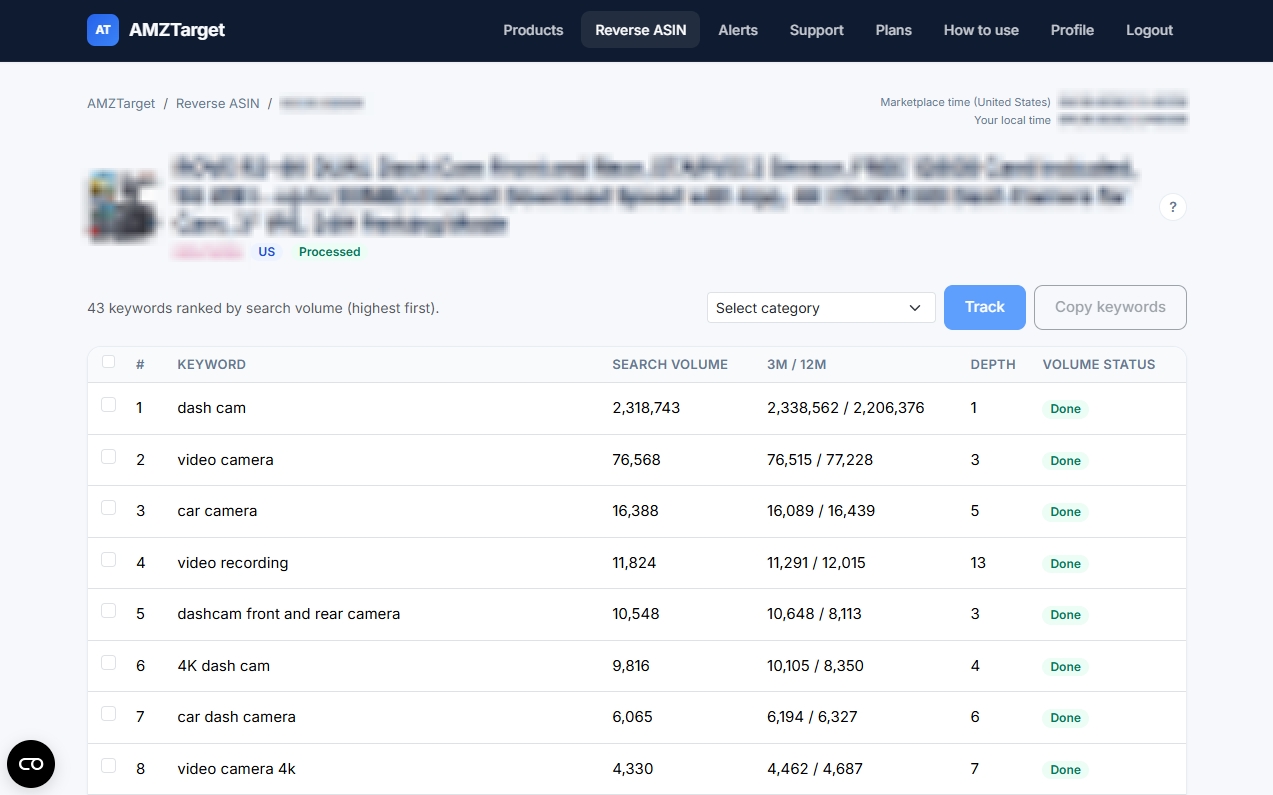
The AMZTarget report shows the same metrics for close phrases and for broader ones. Here is how to read them:
Relevance
This is the first and most important filter. Does the phrase actually describe your product? Even a keyword with huge search volume is useless - and can even be harmful - if your product does not match the query. You will waste traffic and lower your conversion rate.
Estimated search volume (Volume)
This is the estimated number of monthly searches. It helps you understand the scale of a phrase and separate primary keywords from secondary ones.
If the volume status says “Pending,” the data is still loading. If it says “Error,” the request failed. Do not treat either status as zero demand; just give the system a couple of minutes.
Broader phrases
Some Amazon suggestions are useful but wider than the exact product: a category, a use case, a material together with the product, or a close variant. Those rows are marked Broader. Hover the label to read that explanation. Their search volume, trend, and depth load with the other phrases. Show broader hides or shows them. Phrases that point at a different product are left out of the table. A phrase with no search volume is removed.
Comparing demand: 3m vs 12m
This shows the average monthly search volume over the last 3 and 12 months:
- 3m is higher than 12m - demand is growing, or the season has started.
- 3m is lower than 12m - demand is falling, or the season is ending.
This is an excellent signal for trending products and seasonal niches.
Amazon suggestion depth (Depth)
This shows how quickly Amazon suggests the phrase after a shopper starts typing the first letters in the search bar. The lower the number, the earlier the suggestion appears - which means the wording is especially familiar to shoppers.
Actual rank (after adding the keyword to tracking)
Reverse ASIN provides ideas, while the rank tracker shows what is really happening. When you send selected phrases to tracking, AMZTarget starts checking your product's actual place in the search results and shows the page, position, and changes over the last day and week.
How do you run Reverse ASIN in AMZTarget?
It takes just a few clicks:
- Open Reverse ASIN.
- Enter any public ASIN and select the marketplace of that listing, such as US, CA, MX, BR, or UK. That choice applies to this analysis. If you later track the keywords, the new product uses the same marketplace.
- Start the analysis. The service reads the listing, collects Amazon suggestions, and loads search volume for close and broader phrases.
In the finished report, you can:
- Select the most relevant phrases.
- Copy them as a list.
- Click “Track” to send them straight to rank tracking for that ASIN.
If the ASIN is not yet in your product list, AMZTarget will offer to create it and attach the selected keywords with their already loaded search volumes. You do not need to transfer anything through spreadsheets.
How should you compare your listing with a competitor's?
Do not mix the two reports into one pile. Follow two steps:
Step 1. Analyze your own ASIN. Ask yourself: “Am I already tracking all the important meanings and features of my product?” Choose accurate keywords and remove irrelevant ones.
Step 2. Analyze a strong competitor. Ask yourself: “Which relevant phrases does the competitor use that we have missed?”
Do not try to copy every keyword from someone else's listing. Use only phrases that genuinely match your product. Divide what you find into three groups:
- Track now - accurate keywords with clear demand.
- Test - phrases for your PPC account or future content tests.
- Discard - irrelevant, overly broad, or competitor-branded queries.
A 7-step test: from listing analysis to the first results
The AMZTarget Free plan includes 1 Reverse ASIN run per day, 1 product, and 5 tracked keywords. That is enough to run a complete test:
- Step 1. Set a goal. Choose one main ASIN and define the task. For example: “Find 5 keyword phrases to track before revising the title.”
- Step 2. Analyze your listing. Run Reverse ASIN for your ASIN. Wait for search volume, including on phrases marked Broader, and set aside the ones you do not need.
- Step 3. Review the metrics. Select up to 10 candidates based on Volume, the 3m/12m trend, and Depth.
- Step 4. Analyze a competitor's listing. Use the day's quota on the ASIN of a top competitor. Find 2–3 relevant keywords that you do not have.
- Step 5. Send the 5 best keywords to tracking. Select the 5 strongest phrases - a main query, a couple of specific feature phrases, and one trending keyword - and click “Track.”
- Step 6. Record the baseline ranks. Wait for the first scheduled check and see which search-results pages your product appears on for these keywords.
- Step 7. Make a decision. Review the ranks. You now have exact data showing which keywords already bring organic visibility, where the product is “not in the index,” and which phrases may be worth adding to the bullet points or PPC campaigns.
What Reverse ASIN CANNOT do (and why that is fine)
To keep your expectations realistic, remember:
- Reverse ASIN works with the public listing page. It cannot see a competitor's hidden backend keywords, ad bids, conversion rate, or actual margin.
- It does not rewrite Amazon content for you. You do not need Seller Central access to work with public ASINs.
- High search volume does not guarantee that a phrase will bring a million sales. You always need to test conversion in practice.
Connecting an Amazon account through SP-API is required only for the automatic price-change module, Price Timer. Listing analysis, keyword research, and rank tracking work independently with any public ASIN.
From ideas to real numbers
A good Reverse ASIN report is not a thousand random words. It is 5–10 precise search phrases that you can measure to understand where your product's sales are heading.
Create a free account · Compare Reverse ASIN and keyword limits · Run Reverse ASIN · Read the Reverse ASIN guide · Review the results · Track keyword ranks · Set the schedule