
Amazon Black Friday Listing Checklist 2026: What to Check Before, During and After Cyber Monday
Black Friday traffic doesn't forgive small listing problems. A changed main image, a deal price that started an hour late, a new seller who took the Buy Box on Thanksgiving night: on a normal Tuesday that costs a few orders. Over the Black Friday to Cyber Monday weekend it can cost a big share of your Q4 sales on that ASIN, and you usually find out on Monday from the sales report.
This checklist splits the work into four stages: three weeks out, the final week, the four days of the sale, and the week after. Each stage has a short list of things to check and what to do when a check fails. Print the table at the end and give it to whoever is on duty that weekend.
Key dates for 2026
- Thanksgiving: Thursday, November 26.
- Black Friday: Friday, November 27.
- Cyber Monday: Monday, November 30.
In recent years Amazon has started its Black Friday deals well before the Friday itself, so treat the whole period from mid-November to the end of Cyber Monday as one event. The dates that decide deals and inbound inventory were earlier, and for 2026 they have already passed. Amazon's notice Holiday 2026: Same fees, same eligibility, earlier deadlines set:
- Deal submissions for Black Friday Week and Cyber Monday: July 8 through October 20.
- Inventory arrival for the Prime badge during that event: October 14 for Amazon Warehousing and Distribution, October 21 for FBA with minimal shipment splits, and October 28 for FBA with Amazon-optimized splits. These are dates the shipment must reach Amazon, not the day you ship it.
A shipment created in November misses those arrival dates. What is still in your hands is the listing itself: the content, your own price, the Buy Box, and the stock already in the network.
Why "I'll keep an eye on it" doesn't work over this weekend
Sellers who do fine with a manual daily check most of the year often get caught over this weekend, for three reasons:
- More happens. Resellers and arbitrage sellers join popular listings, competitors cut prices, and some listings get detail-page edits from the catalog. Each of these changes is more likely when traffic is high.
- Each hour costs more. A lost Buy Box for six hours on a normal day is a bad morning. On Black Friday, it can be a large share of the day's orders on that ASIN.
- You're not at your desk. It's a four-day holiday weekend in the US. A routine that depends on you opening Seller Central at 9 a.m. doesn't catch a change at 11 p.m. on Thursday.
So the goal for this checklist isn't to check more. It's to know what normal looks like before the sale, and to find out about changes without having to look.
This week: lock the listing and record a baseline
The deal and inbound dates above are closed. Finish the listing work before mid-November.
1. Finish content edits, then freeze them
Make the last changes to the title, bullets, main image, A+ content and backend search terms by mid-November. After that, freeze the listing. Edits made the week of the sale can take time to show up, can be reverted by the catalog, and make it hard to tell whether a drop in conversion came from your change or from the market.
Once the listing is final, save a copy of every field. If something changes during the sale, you'll need the "before" values to restore it and to open a Seller Central case. A listing change monitor records this history automatically, field by field.
2. Confirm your main keywords are indexed
Pick the 5–10 search terms that drive most of your sales and check that the ASIN shows up for each one. A keyword that isn't indexed won't bring any traffic, whatever your deal price. You can test one ASIN against several phrases for free with the Amazon keyword index checker.
3. Add seasonal and gift keywords
Shoppers search differently in Q4: "gift for dad", "stocking stuffer", "christmas gift for her". Type your main keyword into the Amazon search suggestions tool to see which seasonal variants Amazon suggests. If any of them actually describe your product, put them in the backend search terms before the freeze.
4. Record keyword rank and BSR before the sale
Write down your current organic position for each main keyword and your Best Sellers Rank. Without these numbers you can't judge after the sale whether the deal improved your organic position or only moved paid traffic. A keyword rank tracker builds this history for you. If you only need a one-off number, use the free keyword rank checker.
5. Plan stock for the whole period, not just Friday
Stockouts are the quietest way to lose Black Friday. Amazon notes that an offer can't be featured when it's out of stock (Amazon: Featured Offer), so selling out on Saturday hands the Buy Box to whoever still has units, which can be a reseller or a hijacker. Cover Cyber Monday and the week after from units already received or already on the way. A new FBA shipment created now will not meet the October 28 arrival date Amazon published for Prime-badge eligibility.
6. Write down your price plan, including a floor
For each ASIN, decide:
- the regular price and the deal price;
- when the deal price starts and ends (date and time, in the marketplace's time zone);
- the lowest price you'll accept if a competitor undercuts you.
Don't raise your regular price for a week or two just to make the discount look larger. Amazon measures the discount against prices customers could actually get, not against a number you typed in recently.
- A crossed-out List Price is shown only if customers bought the product on Amazon, or another retailer offered it, at or above that price in the past 90 days — 180 days for seasonal products such as winter clothing. Typical Price, the other crossed-out price, is the median of what customers paid over 90 days. Amazon's customer help says limited-time promotions are left out of that median (Strike-Through Pricing and Savings). Amazon also told sellers that from May 18, 2026, if the price sat below that median on more than half of those 90 days, Typical Price includes the promotional sales as well (Upcoming Improvements to Reference Pricing). A short-lived higher price does not become the crossed-out price either way.
- Deals and price discounts have to be at or below the lowest price of the past 30 days, and that low includes earlier promotions, coupons and discounts (Quality guidelines for promotions). Raising today's price does not lift that limit, so a deal above it does not qualify.
Shoppers can also open up to 365 days of price history on the product page (Amazon on how to check a deal).
The final week: set up who hears about what
7. Decide who is on duty, and when
Write down who checks alerts on Thursday night, Friday, the weekend and Monday, and what each person is allowed to change (price, stock, a support case). An alert that reaches someone who can't act on it is no better than no alert.
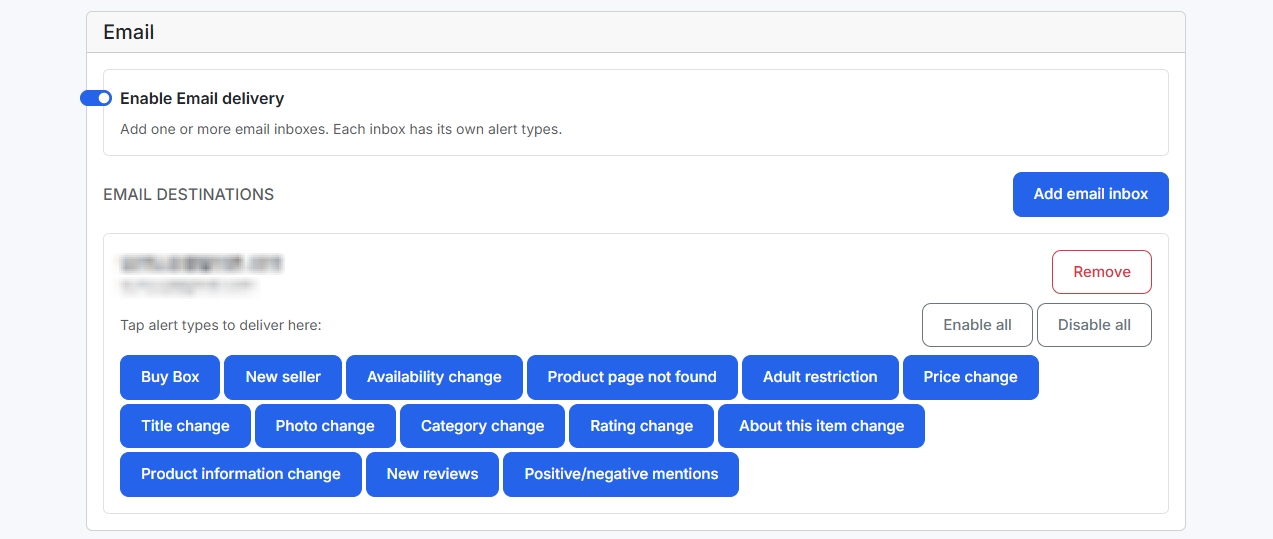
8. Route alerts by urgency
Not every change needs a phone notification on Thanksgiving dinner. Split them:
- Act now: lost Buy Box, a new seller on the listing, a price change you didn't make, out of stock, page not found.
- Today: title, main image, bullets or category changed.
- After the weekend: new reviews and rating changes, unless a review mentions a defect or a fake.
In AMZTarget you choose which events go to which Telegram chat or email inbox, and you can attach dedicated chats to your top ASINs. See Account alerts and Amazon seller alerts.
9. Add your Merchant ID and a check from the right location
Buy Box alerts only make sense if the tool knows which offer is yours, so add your Merchant ID in Profile. Also keep in mind that offers, prices and the Featured Offer depend on the shopper's delivery location. If you look at your US listing from abroad, you may see a different winner. AMZTarget checks listings with a delivery ZIP code in the target marketplace.
10. Schedule price changes instead of setting an alarm
The sale price on a listing is three fields: the price, a start date and an end date. There is no hour. In a Seller Central support reply, Amazon said the regular price is shown again after 00:00 on the sale end date, so an end date of December 1 means the sale price stops as December 1 begins, not on the evening of that day (Setting a sale end date). If the price has to change at a chosen hour, or more than once over the weekend, use a scheduler. AMZTarget's price timer sends scheduled prices to Amazon through SP-API at the date and time you set, in the marketplace's time zone (Starter plan and above). Double-check the seller SKU for each offer. A wrong SKU means the price won't change.
11. Increase check frequency for the sale
How quickly you hear about a change depends on how often the listing is checked. One check a day is fine for long-tail products in March. For your top ASINs over Black Friday, plan for several checks a day. You can set the hours per product in the check schedule.
During the sale (Thanksgiving to Cyber Monday): what to watch
Don't check everything. Watch these signals and respond to each one in a planned way.
| Signal | Likely cause | First action |
|---|---|---|
| Buy Box lost | Undercut, new seller, stockout, or your deal ended early | Open the offer list; compare price and fulfilment; respond within your floor |
| New seller on the listing | Reseller, arbitrage, or a hijacker | Screenshot the offer and seller ID; follow the hijacker steps |
| Your price changed unexpectedly | Repricer rule, deal start/end, a mistaken edit | Check the price history and the deal status in Seller Central |
| Out of stock | Sell-through faster than planned | Check inbound shipments; consider raising price to slow sales on the last units |
| Page not found / unavailable | Suppression or a catalog problem | Seller Central → Manage All Inventory and Account Health; open a case |
| Title, image or bullets changed | Catalog edit or another contributor | Restore from your saved copy; open a case with before/after values |
| New 1–2 star review mentioning fakes or defects | Bad units, possibly from another seller | Check which offer the buyer bought from; save the review |
Keyword rank: expect more movement than usual. Deals, ads and competitor promotions all reshuffle search results during the event. Compare against your baseline once a day rather than reacting to every check. In AMZTarget, rank changes are shown in the keyword table (Δ1 and Δ7) and in Analytics charts. There is no push alert for rank drops, so look at them during your daily review.
Price wars: if a competitor or reseller drops below your floor, let them have the Buy Box for a while rather than selling at a loss. Margin you give away on Black Friday doesn't come back in December.
The week after: put things back and learn
12. Confirm the deal prices ended
Check every ASIN on Tuesday, December 1. A sale price that kept running a week after Cyber Monday is an expensive mistake that nobody notices, because sales look good.
13. Compare rank and BSR against the baseline
Did main keywords end the event higher, lower or where they started? A deal that sold a lot of units but left organic rank where it was still did its job on revenue. A deal that pushed several keywords up for a week afterwards is worth repeating for Prime Day.
14. Review what the alerts caught
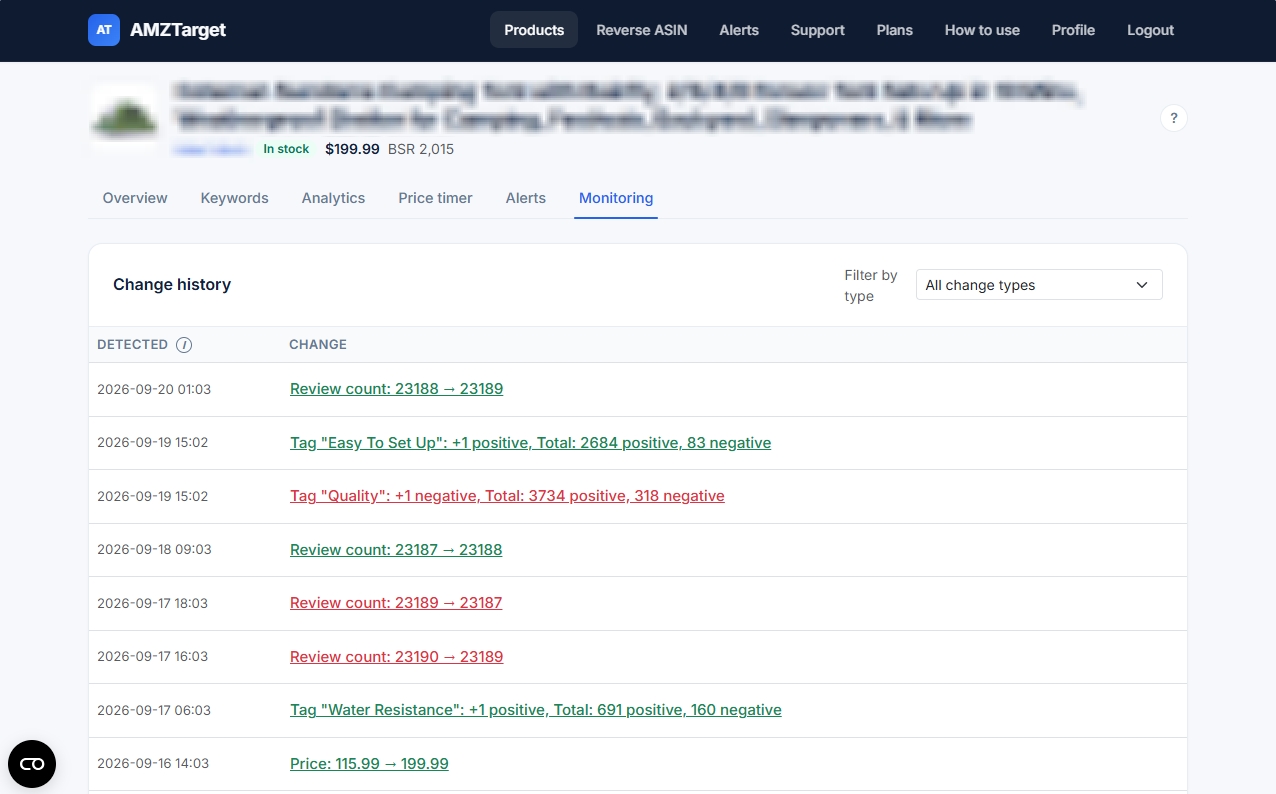
Go through the change history: how many Buy Box losses, new sellers and content edits happened, and how long each took to fix. That tells you whether the check frequency and on-duty plan were enough, before the December sales and Q1.
15. Read the new reviews
Holiday buyers leave reviews in December and January. Look for repeated complaints about packaging, sizing or authenticity: these often point to a real listing or product issue, or to units from another seller.
The checklist (copy this)
| # | When | Check | Done |
|---|---|---|---|
| 1 | Before the sale | Content edits finished; listing frozen; copy of every field saved | ☐ |
| 2 | Before the sale | Main 5–10 keywords indexed | ☐ |
| 3 | Before the sale | Seasonal and gift keywords added to backend search terms | ☐ |
| 4 | Before the sale | Keyword rank and BSR baseline recorded | ☐ |
| 5 | Before the sale | Stock already received or inbound covers Cyber Monday | ☐ |
| 6 | Before the sale | Regular price, deal price, start/end and price floor written down | ☐ |
| 7 | Final week | On-duty person for each day, with what they may change | ☐ |
| 8 | Final week | Alerts routed: urgent to Telegram, the rest to email | ☐ |
| 9 | Final week | Merchant ID added; listing checked from a delivery ZIP code in the marketplace | ☐ |
| 10 | Final week | Deal price start/end scheduled; SKUs verified | ☐ |
| 11 | Final week | Check frequency increased for top ASINs | ☐ |
| 12 | Week after | Deal prices ended on every ASIN | ☐ |
| 13 | Week after | Rank and BSR compared with baseline | ☐ |
| 14 | Week after | Incidents and response times reviewed | ☐ |
| 15 | Week after | New reviews read for repeated complaints | ☐ |
Where AMZTarget fits (and its limits)
AMZTarget covers the "find out without looking" part of this checklist. You add an ASIN, it saves a baseline of sellers, price, Buy Box owner, stock and listing content, and every scheduled check compares the page against that baseline. When something changes, an alert goes to Telegram (a DM, a team group or a channel) or to email. It reads public product pages, so the alerts don't need Seller Central access. Only the price timer connects to your seller account through SP-API.
Being honest about the limits matters more than usual before a big sale:
- Alerts arrive after a check, not the moment something changes. Free checks once a day, Starter up to 6 times a day ($19/mo), Growth up to 12 ($49/mo) and Pro up to 24 ($99/mo). See plans.
- Free gets 12 checks a day only for the first 14 days after signup. If you sign up in early November, that window ends before Black Friday. For a sale-weekend setup on your main ASIN, Starter is the realistic minimum.
- Scheduled price changes start on Starter; following a competitor's price starts on Growth.
- Review alerts start on Starter.
- No push alert for keyword rank drops. Use the keyword table and Analytics instead.
Try it on one listing before the rush
Pick the ASIN you'd least like to lose over Thanksgiving weekend. Add it with its five main keywords, connect a Telegram chat, add your Merchant ID and turn on Buy Box, new seller, price and stock alerts. Run it for a week before the sale so you know what normal looks like.
Start tracking one ASIN for free →
FAQ
When should I start preparing my Amazon listings for Black Friday?
For 2026, the deal submission window closed on October 20, and the last FBA arrival date Amazon published for the Prime badge was October 28. In November the work left is the listing: finish content edits, record keyword rank, schedule your price and turn on alerts. For a later event, start when Amazon opens submissions. In 2026 that date was July 8, for both Prime Big Deal Days and Black Friday Week.
Should I change my listing title or images right before Black Friday?
It's usually better not to. Changes made during the event week can take time to appear, can be overwritten by catalog updates, and make it hard to tell what caused a change in conversion. Finish edits by mid-November and freeze the listing until after Cyber Monday.
Does Amazon notify me if I lose the Buy Box during a deal?
Amazon doesn't send a standard notification each time your offer loses the Featured Offer. Sellers usually notice from Business Reports, the offer list, or falling sales, or they use a monitoring tool that checks the listing on a schedule and sends an alert when the Buy Box owner changes.
How often should I check my listings over Black Friday and Cyber Monday?
Several times a day for the ASINs that make most of your Q4 revenue, and once a day for the rest. The right number depends on how much a few hours of lost Buy Box or a stockout would cost you. Our guide on how often to check Amazon keyword rank uses the same risk-based approach.
Can I schedule an Amazon price change for a specific time on Black Friday?
The sale price on a listing is a price, a start date and an end date. Amazon support says the regular price returns after 00:00 on the end date, and the form has no hour (Setting a sale end date). To change the price at a specific time, or in several steps, use a scheduler connected through SP-API, such as AMZTarget's price timer. Times there use the marketplace's time zone.
What should I check after Cyber Monday?
Confirm that every deal price has ended, compare keyword rank and BSR with your pre-sale baseline, review which incidents happened and how fast you fixed them, and read new reviews for repeated complaints. For a short routine to keep using after the sale, see the daily Amazon listing health check.
Amazon, Seller Central and Best Sellers Rank are trademarks of Amazon.com, Inc. or its affiliates. AMZTarget is an independent tool.