
Why Did My Amazon Sales Drop? How to Read Price, BSR, Keyword Rank, and Buy Box Together
Your daily units dropped by half, and Seller Central doesn't tell you why. When you look at one number in isolation, it's easy to make an expensive mistake: raising PPC bids when another seller actually took your Buy Box, cutting price when a catalog edit removed a keyword from your title, or panicking over a "lost" rank that only happened because you searched without a US delivery ZIP code.
To find the real cause quickly, you have to read five signals together on the same timeline: price, Buy Box ownership, listing edits, Best Sellers Rank (BSR), and organic keyword rank. Below is how those metrics move in sequence, a real three-chart walkthrough from AMZTarget, a 6-pattern diagnostic table that connects them, and the three false alarms that masquerade as rank drops.
Why looking at one metric leads to the wrong fix
On Amazon, problems rarely hit every metric in the same hour. They travel down a chain:
- Hour 0 - the trigger. A price increases, a promotion ends, a reseller takes the Featured Offer (Buy Box), FBA sellable stock hits zero, or a catalog update rewrites your title.
- Hours 1 to 24 - conversion or offer share shifts, then BSR reacts. Amazon updates Best Sellers Rank hourly, weighting recent sales more heavily than older ones. One crucial exception: if a hijacker or reseller takes the Buy Box on your ASIN and keeps selling units, the ASIN's BSR can stay healthy while your own orders plunge.
- Days 1 to 5 - organic keyword rank follows. Fewer orders per search query pull your listing down from page 1 to pages 2-5. Lower rank cuts sessions further, which pushes BSR and rank down a second time.
If you only check keyword positions once a week, you arrive at step 3 and assume you have an "SEO problem" - when the real trigger was a price jump or a 36-hour Buy Box loss four days earlier.
Real case on three charts: how a price jump pulls down BSR and rank
Here is how that chain looks inside AMZTarget's Analytics tabs on a tracked dash cam listing over two weeks in September.
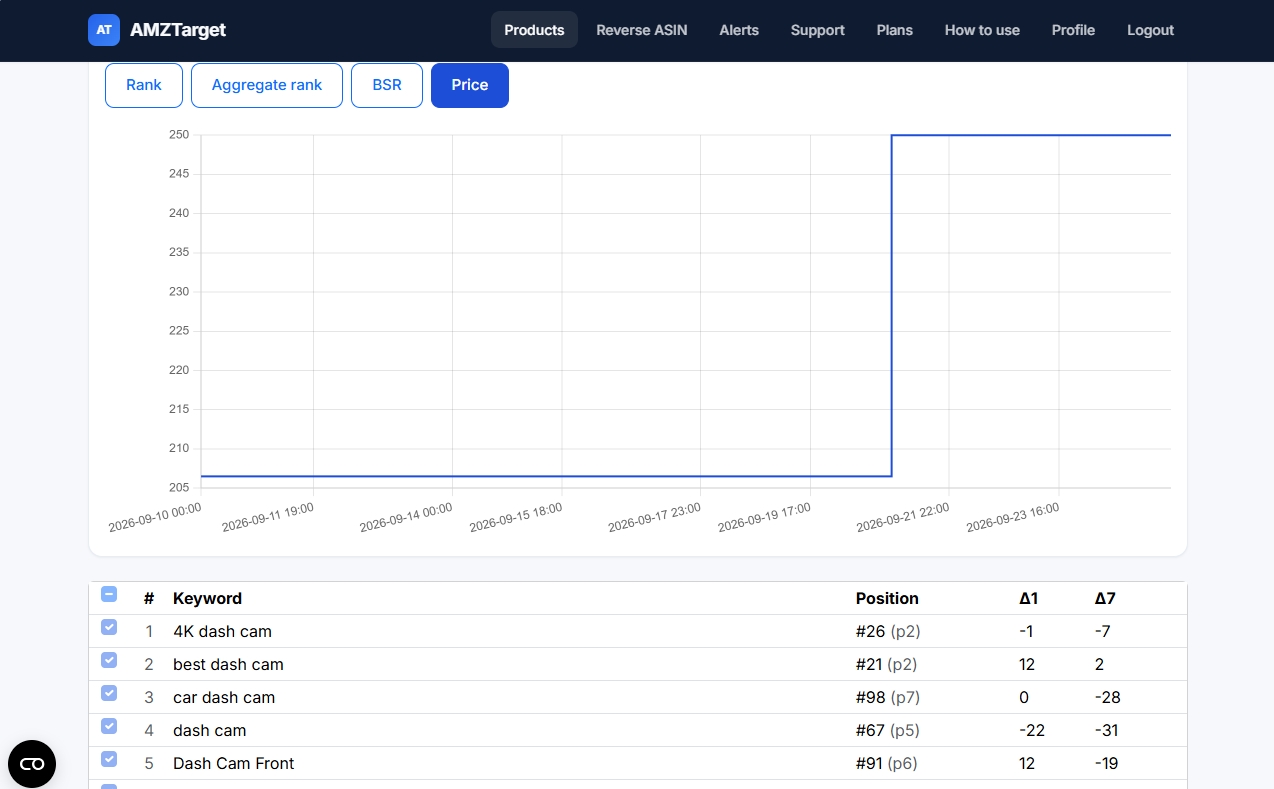
1. The trigger on the Price chart
From September 10 through the evening of September 21, the listing sold steadily around $206.50-$207. At 22:00 on September 21, the seller raised the price to $250 - roughly a 21% jump in a single step.
2. The immediate sales slowdown on the BSR chart
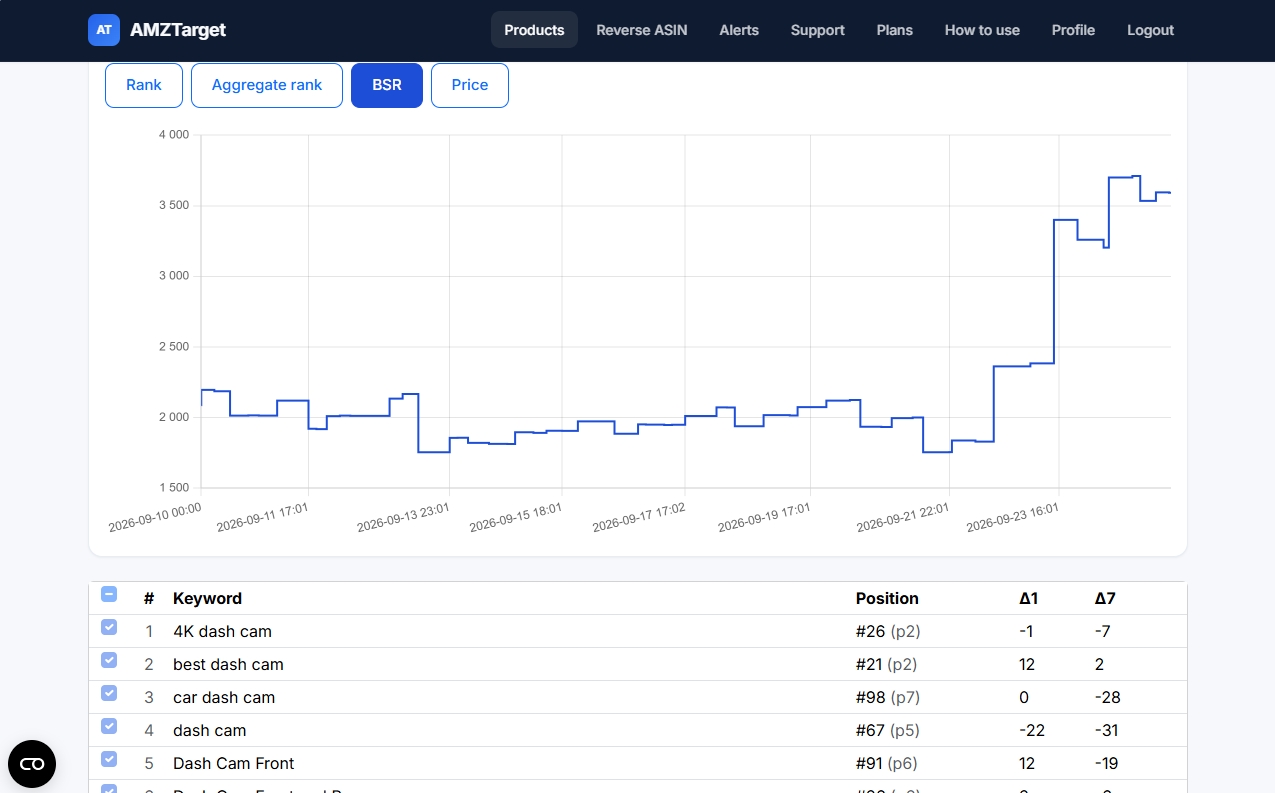
Switch to the BSR tab over the exact same date range (remember: a lower BSR number means stronger sales; a rising line means worse rank and fewer orders). While the price sat near $207, BSR stayed between 1,700 and 2,200. Within hours of the $250 price change on September 22-23, BSR climbed steeply to nearly 3,700. Shoppers were still finding the page, but far fewer were buying.
3. The delayed fallout on the Keyword Rank chart
Now open the Rank tab and look at both the curves and the 7-day movement (Δ7) in the table below the chart:
dash camslid to #67 (p5), losing 22 spots in a day (Δ1 −22) and 31 spots over the week (Δ7 −31).car dash camdropped to #98 (p7, Δ7 −28).Dash Cam Frontfell to #91 (p6, Δ7 −19).4K dash camslipped off page 1 to #26 (p2, Δ7 −7).- Meanwhile,
best dash cambounced up 12 spots intraday (#21, Δ1 +12) - normal single-keyword noise that would have fooled anyone checking just one phrase by hand.
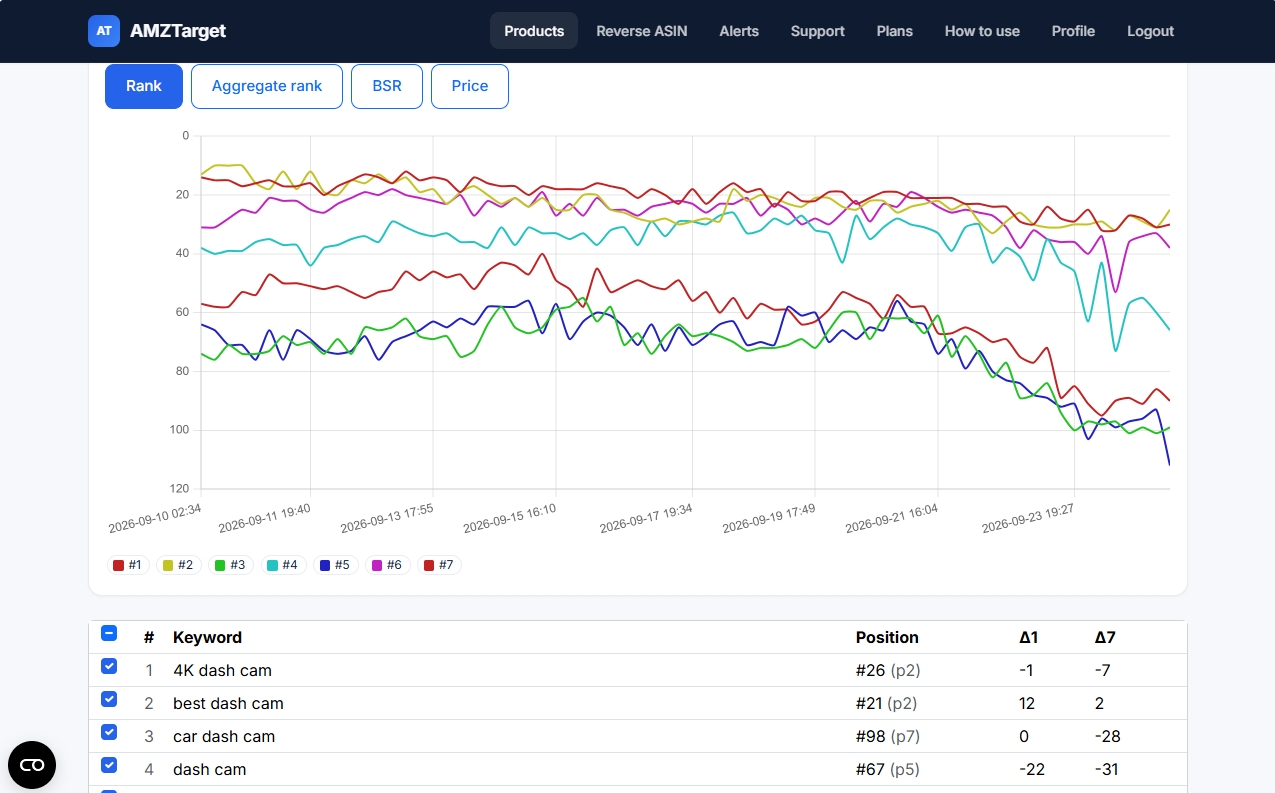
Why this matters for margin: an aggressive price hike often costs twice. First you lose orders while conversion stalls; then, once core keywords fall to pages 5-7, simply putting the price back to $207 isn't always enough - you may have to spend extra on Sponsored Products to rebuild sales velocity back to page 1. When testing higher prices, move in smaller steps (for example via scheduled price changes) and watch BSR for 48 hours before pushing further.
The 6-pattern diagnostic table: match what moved against what stayed flat
Before changing bids, copy, or price, compare which metrics moved and which stayed still. Each combination points to a different root cause:
| # | What moved | What stayed flat (at first) | Most likely cause | First check & full playbook |
|---|---|---|---|---|
| 1 | Your price rose (or a deal/coupon ended), BSR climbed, then several main keywords dropped | Listing copy, seller count | Conversion dropped after crossing a price threshold - or high price triggered Buy Box suppression ("See options") | Compare Price → BSR → Rank in Analytics; check Pricing Health in Seller Central. See Black Friday price & deal rules and Price Timer. |
| 2 | Your orders dropped immediately, Buy Box alert fired or seller count rose | ASIN BSR and organic keyword rank stay near normal | Another seller (reseller, arbitrage, or hijacker) holds the Featured Offer and gets the orders on your ASIN | Open the listing with a local ZIP; check Seller ID vs your Merchant ID. Follow Lost the Amazon Buy Box? or Listing hijacked guide. |
| 3 | 1-3 specific keywords plunged overnight or show Not in search index; BSR worsens later | Price, Buy Box, and unrelated keywords | Silent catalog edit to title, bullets, category, or an adult restriction flag broke relevance | Check before/after diffs in Monitoring and run the free Amazon keyword index checker. Full steps: Amazon listing changes. |
| 4 | BSR climbed and shared keywords slipped gradually over several days | Your price, Buy Box, stock, and listing content are untouched | A direct competitor cut price, added a coupon, swapped their main image, or pushed a launch | Compare your ASIN against 3-5 tracked rivals on the same keywords. Full steps: How to track Amazon competitors and Reverse ASIN guide. |
| 5 | BSR spiked fast, availability flipped to unavailable or page returned 404, Buy Box vanished | Listing text | Out of sellable FBA stock (even if units are inbound/FC transfer) or listing suppression | Check Manage All Inventory and Account Health in Seller Central; route urgent stock/404 triggers via Telegram alerts. |
| 6 | One keyword shows a dash (-) or jumps 30+ spots on a manual check | Your orders, BSR, and other keywords are completely steady | False alarm: Amazon rotated a child variation in search, or you checked without a local delivery postal code | Verify child ASINs and postal codes before touching the listing - see the next section. |
Three false alarms that look like a rank drop (when sales are fine)
Not every scary number in a spreadsheet is a real drop. Three technical quirks regularly trick sellers into fixing listings that aren't broken.
1. Searching without a local delivery ZIP or postal code
Amazon tailors search results, stock status, and the Featured Offer to the shopper's delivery address. If you open amazon.com from Europe, Latin America, or Asia - or in an incognito browser with no local address set - Amazon defaults delivery to your IP's country. Four things break at once:
- False "Currently unavailable": FBA or FBM offers that don't ship internationally look out of stock to you while domestic Prime buyers order normally.
- Wrong Buy Box winner: delivery speed to the buyer's address is a core Featured Offer factor, so viewing from abroad can show a different seller - or "See options".
- Shifted organic rank: listings ineligible for international shipping are hidden or demoted in search, scrambling page-1 positions.
- Regional FBA splits inside the same country: if a new shipment just checked in on the West Coast while East Coast warehouses are still receiving transfers, a buyer in Los Angeles (
90001) and a buyer in New York (10001) can temporarily see different delivery promises and slightly different ranks.
Whenever you check a listing manually, set a real domestic postal code for that storefront first:
| Marketplace | Storefront | Example domestic postal code | Storefront time zone in AMZTarget |
|---|---|---|---|
USA (US) | Amazon.com | 10001 (New York) | America/Los_Angeles |
UK (UK) | Amazon.co.uk | SW1A 1AA (London) | Europe/London |
Canada (CA) | Amazon.ca | M5V 2T6 (Toronto) | America/Los_Angeles |
Mexico (MX) | Amazon.com.mx | 06600 (Mexico City) | America/Los_Angeles |
Brazil (BR) | Amazon.com.br | 01310-100 (São Paulo) | America/Sao_Paulo |
AMZTarget applies a domestic postal code automatically on scheduled checks across all five marketplaces (and also in the free Amazon keyword rank checker). And if a previously ranked keyword suddenly misses on one pass, the tracker re-verifies it on the last postal code where that ASIN was found before recording "not found" - filtering out one-off regional blips.
2. Child variation swaps on color/size families
On variation listings, Amazon usually displays one child ASIN from your family in organic search for a given keyword. Next Tuesday, because of stock levels, price, or click-through on another color, Amazon may show a sibling child ASIN in that exact same organic slot.
If you track only one child ASIN without family variations attached, your tracker reports "not found" (-) even though shoppers still see your product on page 1. Keep Variations from listing enabled when adding an ASIN: AMZTarget pulls the sibling child ASINs from the product page and counts the position whenever any ASIN in the family ranks, without spending extra product slots on your plan.
3. Mixing up time zones and chart aggregation windows
Two subtle chart details prevent misreading cause and effect:
- Three clocks exist for a reason. Analytics charts and check schedules use that product's marketplace time zone. The clock in the top header follows your default profile marketplace, and Price Timer schedules run in your seller account's marketplace time. Always line up a Seller Central event against the marketplace clock, not your laptop's local time.
- How multi-week charts condense hourly data. On ranges longer than three days of hourly checks, AMZTarget caps charts at 72 intervals so they stay readable: keyword rank curves show interval averages, while Price and BSR preserve the real high and low measurements in each interval. That way a 4-hour price mistake or brief BSR spike won't get smoothed away on a 30-day view - and zooming into a 3-day window reveals every individual hourly check.
A 15-minute troubleshooting order (plus the 30-second AI shortcut)
When sales dip, resist opening PPC Manager first. Run through these five checks in order - an incident version of our 10-minute daily Amazon listing health check:
- Check urgent alerts first (2 min). Did Buy Box ownership, seller count, price, stock, adult flag, or page availability change? (Make sure your Merchant ID is saved in Profile, or Buy Box and new-seller alerts stay inactive.)
- Open the Monitoring timeline (3 min). Filter for title, main image, bullets, product details, and category edits. Save before/after values immediately if Amazon or another contributor changed your page.
- Compare Price → BSR → Starred Keywords in Analytics (5 min). Star your 5-7 money keywords on the Keywords tab so they load on the Rank chart automatically. Switch between Price, BSR, and Rank on a 7-day or 15-day window to see which line moved first, and check Δ1 vs Δ7 to separate one-day noise from a weekly slide.
- Compare against tracked competitors (3 min). Check whether a rival ASIN on your shared keywords dropped price or jumped in rank on the same day.
- Pick one fix and log the date (2 min). Change one variable at a time - restore copy, adjust price within your floor, open a Seller Central case, or address stock - so next week's chart tells you cleanly whether the fix worked.
Run the same cross-check in plain language via AI access
If you track multiple ASINs and don't want to click between tabs, you can connect Claude, Cursor, or another remote MCP client via AI access in Profile. The key is strictly read-only - it reads your account's completed checks (products, keyword positions and deltas, price and BSR series, listing change diffs, and Reverse ASIN reports) and can never edit listings, alerts, or prices.
Paste prompts like these when investigating a drop:
- "On ASIN B0XXXXXXXX over the last 14 days, compare price history, BSR, and rank history for my top keywords - what changed first?"
- "List every tracked ASIN where BSR got worse this week, and check whether price, Buy Box, seller count, or listing fields changed right before it."
- "Which keywords on B0XXXXXXXX lost more than 10 spots over 7 days (
delta_7d), and did any listing changes happen in the same window?"
Honest limits and how to set up your baseline on one ASIN
You can't diagnose a sudden drop if you only add a tracker after the drop happened - nothing can reconstruct last Tuesday's organic rank or Buy Box owner retroactively. Having even a basic baseline running ahead of time changes everything, as long as you know the tool's real boundaries:
- Scheduled checks, not instant streaming. Free checks once a day (up to 12 checks/day for the first 14 days), Starter up to 6/day ($19/mo), Growth up to 12/day ($49/mo), and Pro up to 24/day ($99/mo). See how often to check Amazon keyword rank and plans.
- No push alert for keyword rank drops. Telegram and email alerts cover 14 product events (Buy Box, new sellers, price, stock, 404, adult flag, title, main image, bullets, product details, category, rating, and - from Starter - reviews). Keyword rank trends live in the keyword table (
Δ1,Δ7) and Analytics charts. - No Seller Central login needed for monitoring. Rank tracking, listing diffs, Buy Box/seller checks, Reverse ASIN, and AI access all read public Amazon pages. SP-API is only required if you turn on Price Timer (scheduled price changes from Starter; competitor-following repricer from Growth).
Set up your safety baseline in 10 minutes (Free plan, no card):
- Create a free account (1 product, 5 keywords, 1 Reverse ASIN lookup/day, 1 month of history).
- Add your highest-revenue ASIN on its marketplace (
US,UK,CA,MX, orBR) and keep Variations from listing checked. - Add its 5 main revenue keywords (use Reverse ASIN if you aren't sure which phrases matter most) and star them.
- Save your Merchant ID in Profile and connect one Telegram chat or email for Buy Box, new seller, price, stock, and title/image edits.
Next time orders dip, you'll have the exact timeline of Price, BSR, Buy Box, listing edits, and organic rank ready in one place instead of guessing.
Start tracking one ASIN for free →
FAQ
Why did my Amazon sales drop overnight when my keyword rank didn't change?
Check Buy Box ownership, seller count, price, and stock first. Organic keyword rank usually lags behind sales by one to several days. If another seller took the Featured Offer on your ASIN, shoppers on page 1 are still buying - the orders are just going to that seller's offer while the ASIN's BSR and keyword positions look normal.
How fast does a price increase affect BSR and organic keyword rank on Amazon?
Conversion reacts immediately, and Best Sellers Rank usually reflects slower sales within hours to a day because Amazon updates BSR hourly with extra weight on recent orders. Organic keyword rank typically slides over the next 1 to 5 days across multiple keywords if lower sales velocity persists.
Why do I see a different Amazon keyword rank than my rank tracker?
Manual searches depend on your delivery ZIP or postal code, browser history, device, and whether you count Sponsored ads or sibling child variations. Searching amazon.com from abroad without a domestic US ZIP code hides domestic-only offers and reshuffles page 1. AMZTarget skips Sponsored placements, uses a local postal code for the listing's marketplace, and counts any child ASIN in the family when variations are enabled.
How can I tell if my listing lost keyword indexing vs just dropped in rank?
A rank drop moves your ASIN to a lower page (for example from page 1 to page 4), whereas de-indexing means Amazon returns zero results for your ASIN + keyword combination - often after a title, bullet, category, or adult-flag change. In AMZTarget's keyword table, de-indexed terms show Not in search index; you can also test phrases anytime with the free Amazon keyword index checker.
Does raising ad bids fix a rank drop caused by a price hike or listing edit?
Usually it just burns budget. More ad clicks sent to an uncompetitive price, a suppressed Buy Box, or a broken main image still convert poorly, and weak conversion keeps pulling organic rank down. Fix the underlying conversion or Buy Box issue first, then use PPC to rebuild velocity if needed.
Do I need to connect Seller Central to track Price, BSR, Buy Box, and keyword rank?
No. AMZTarget tracks organic keyword positions, price history, BSR, Buy Box ownership (using your public Merchant ID), seller count, and listing content changes from public Amazon pages without Seller Central access. Connecting via SP-API is only needed if you use Price Timer to change your prices automatically.
Amazon, Seller Central and Best Sellers Rank are trademarks of Amazon.com, Inc. or its affiliates. AMZTarget is an independent tool.